Malware of the Day – Encrypted DNS Comparison: Detecting C2 When You Can’t See the Queries
What is Malware of the Day?
Lab Setup
Malware: dns-c2-comparison (Custom Go-based DNS C2 simulator)
MITRE Tactics: TA0011 Command and Control, T1071.004 Application Layer Protocol: DNS, T1573 Encrypted Channel
Traffic Type: DNS (Plain), DNS-over-HTTPS, DNS-over-TLS, DNS-over-QUIC
Connection Type: UDP (Plain DNS, DoQ), TCP (DoH, DoT)
C2 Infrastructure: Custom authoritative nameserver (48.217.188.16)
Origin of Sample: Active Countermeasures Threat Hunting Lab
Host Payload Delivery Method: EXE binary (C2 agent)
Target Host/Victim: 192.168.2.88 (Windows 10 Enterprise x64)
Beacon Timing: 5-second intervals with ±2 second jitter
Malware of the Day Mission
To identify and share examples of post-compromise network activity in order to better detect and respond to potential network threats. Specifically we are looking for Command and Control (C2) communication channels used by attackers to obtain intelligence, issue commands, and exfiltrate data through a compromised host or hosts.
Background
The Original: Plain DNS
Traditional DNS operates over UDP port 53. Queries and responses travel in cleartext, making them fully visible to anyone positioned to observe network traffic. For defenders, this visibility is a gift. We can inspect the actual query contents, calculate subdomain entropy, and track query frequency – multiple vectors that each allow us to potentially identify tunneling attempts.
When an attacker uses DNS for C2, agent-to-server communication typically encodes data in subdomain strings. A query like 998DD657EB6C8D12FAB3982.attacker.com might decode to a beacon check-in or exfiltrated data. With plain DNS, we see everything: the encoded subdomain, the queried domain, the response type, and the answer. Detection tools can calculate entropy scores, flag unusually long subdomains, and identify high unique subdomain counts.
This visibility makes DNS monitoring a cornerstone of network defense. But what happens when DNS is encrypted and we can no longer inspect the application layer data?
DNS-over-TLS: The First Encrypted DNS
DoT, specified in RFC 7858 (2016), was the first standardized approach to encrypting DNS traffic. The motivation was privacy – preventing ISPs and other network observers from seeing which domains users query. The concept is straightforward: wrap DNS in TLS and use a dedicated port (853). The DNS query structure remains unchanged; it simply travels inside a TLS tunnel rather than in cleartext.
Technically, DoT works at the application layer. The client establishes a TLS connection to port 853 on the resolver, then sends standard DNS wire-format queries through the encrypted tunnel. The TLS layer handles confidentiality and integrity. From the network perspective, we see TCP/853, TLS handshake metadata, and encrypted payloads. Query contents are hidden from network observers.
However, DoT’s dedicated port proved to be its weakness. Port 853 traffic is uncommon – in many enterprise environments, it might be entirely absent from normal operations. An outbound connection to port 853 immediately stands out as suspicious.
For enterprises, encrypted DNS poses a problem: it bypasses DNS-based security controls, content filtering, and monitoring. Organizations lose visibility into what domains endpoints are resolving. Network administrators can easily block port 853 outbound to prevent this, forcing clients back to plain DNS or generating alerts when the block is violated. At the application layer, it’s also trivial to identify DoT traffic for what it is: encrypted DNS.
DNS-over-HTTPS: Hiding in Plain Sight
DoH, standardized in RFC 8484 (2018), emerged as a response to DoT’s shortcomings. Rather than using a dedicated port, DoH wraps DNS queries inside HTTPS connections on port 443 – the same port used for virtually all encrypted web traffic.
The technical implementation works as follows: the client establishes a TLS connection to the DoH resolver, then sends DNS queries as HTTP POST or GET requests. The query itself sits in the HTTP body or URL parameters, encrypted by the TLS layer. From the outside, we see a TCP connection to port 443, TLS handshake metadata (including SNI if not encrypted), and encrypted application data. The actual DNS query – the domain name, record type, and response – remains hidden.
For defenders, DoH presents a significant challenge. The traffic looks like ordinary HTTPS. It uses the same port as web browsing, streaming, and countless other legitimate services. Without TLS interception, we cannot see the DNS queries inside. A user visiting a banking site and an attacker beaconing to a C2 server look remarkably similar at the network layer. Blocking port 443 outbound is impractical for most organizations.
Attackers appreciate DoH for these reasons. It blends with normal traffic, making detection difficult. Many organizations permit HTTPS outbound without restriction. Public infrastructure is provided by trusted companies like Google and Cloudflare, though attackers can also run their own DoH servers.
DNS-over-QUIC: A Step Backward?
DoQ, standardized in RFC 9250 (2022), represents the newest encrypted DNS protocol. It transports DNS over the QUIC protocol, which itself runs over UDP. QUIC was designed by Google to improve web performance, reducing connection establishment latency by combining transport and cryptographic handshakes into a single round-trip.
DoQ inherits these performance benefits – connection setup is faster than TCP-based DoT or DoH, skipping the separate TLS handshake. In practice, this saves approximately 20 – 50 milliseconds per connection. For privacy-conscious users, DoQ offers similar protections to DoT and DoH: encrypted queries hidden from network observers.
From an attacker’s perspective, however, DoQ represents something of a regression. It once again uses an unusual port (853 or 8853), making it conspicuous in the same way DoT is. At the application layer, DoQ traffic is clearly not HTTP – it’s QUIC carrying DNS, which reveals that encrypted DNS is being used. These characteristics give defenders detection opportunities that DoH had eliminated. Tooling support for QUIC analysis is still maturing, but the protocol’s architectural choices make it less attractive for covert C2 than DoH.
Scenario
Today’s edition works a little different from our usual format. Rather than simulating a single attack scenario, we’re conducting a comparative study. Our focus: understanding how different encrypted DNS protocols affect our ability to detect command-and-control communications.
DNS has long been a favorite channel for adversaries. The protocol is ubiquitous and almost always permitted through firewalls. But the landscape is shifting. Privacy-focused encrypted DNS protocols are gaining adoption, and attackers have noticed.
We built a custom tool specifically for this comparison. Rather than using existing malware or C2 frameworks, we developed a Go-based simulator that implements identical beacon behavior across all four DNS modes. This approach ensures a fair comparison: identical timing, identical payload patterns, identical behavior – only the transport changes.
The agent runs on a Windows endpoint and communicates with our server infrastructure on a DigitalOcean droplet. Every five seconds (with slight jitter – plus-or-minus 2 seconds), it generates a high-entropy subdomain and transmits it as a DNS query. The server responds with appropriate DNS answers. This pattern continues for 24 hours per protocol.
We captured four separate datasets:
- Plain DNS: Traditional UDP/53 queries
- DoH: HTTPS/443 to a custom DoH endpoint
- DoT: TLS/853 connections carrying DNS
- DoQ: QUIC/8853 with DNS payloads
In the following sections, we examine what each dataset reveals. We start with network analysis using RITA to see what behavioral patterns surface, then dive into raw Zeek logs to understand exactly what visibility remains.
Network Behavioral Analysis: Plain DNS
We begin with our baseline – plain DNS over UDP port 53. This is the traffic we have full visibility into, and the results confirm what we’d expect.
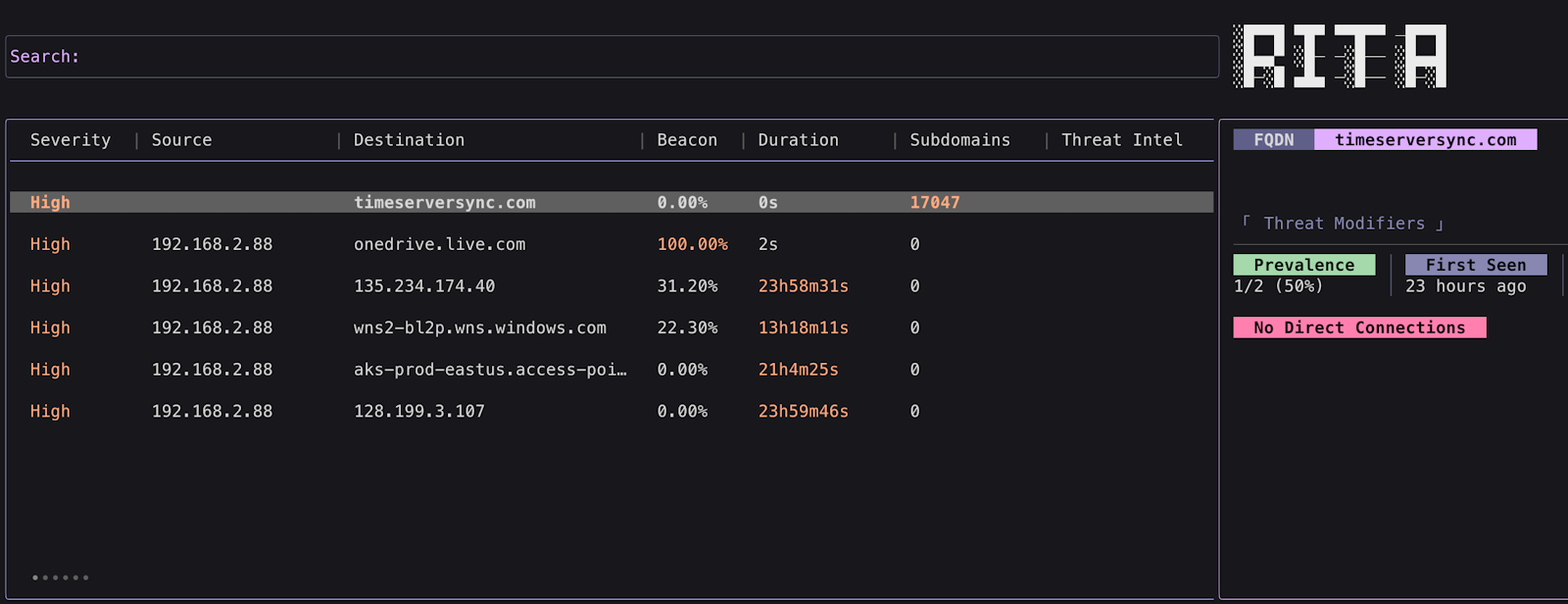
Figure 1. RITA analysis of plain DNS C2 traffic showing high severity score and 17,047 unique subdomains.
RITA immediately flags this activity with a high severity score. The destination is timeserversync.com – and because this is plain DNS, we can perform a reputation check on that domain.
But the real smoking gun is the subdomain count: 17,047 unique subdomains queried for a single domain. No legitimate service generates that kind of subdomain diversity. Even large CDNs or cloud services don’t come close to this pattern.
The other telling indicator: no direct connections. The host resolved timeserversync.com over 17,000 times but never actually connected to any of the resolved addresses. There are legitimate scenarios where DNS resolution doesn’t lead to direct connections – DNS-based load balancing, content delivery networks that resolve to cached content, or applications that pre-resolve addresses for later use. But 17,047 resolutions with zero follow-up connections is a massive red flag.
None of this is surprising. Plain DNS tunneling detection is well-established territory, and we’ve covered it in previous articles in this series. The question is: what happens when we can no longer see these indicators?
Network Behavioral Analysis: DNS-over-TLS
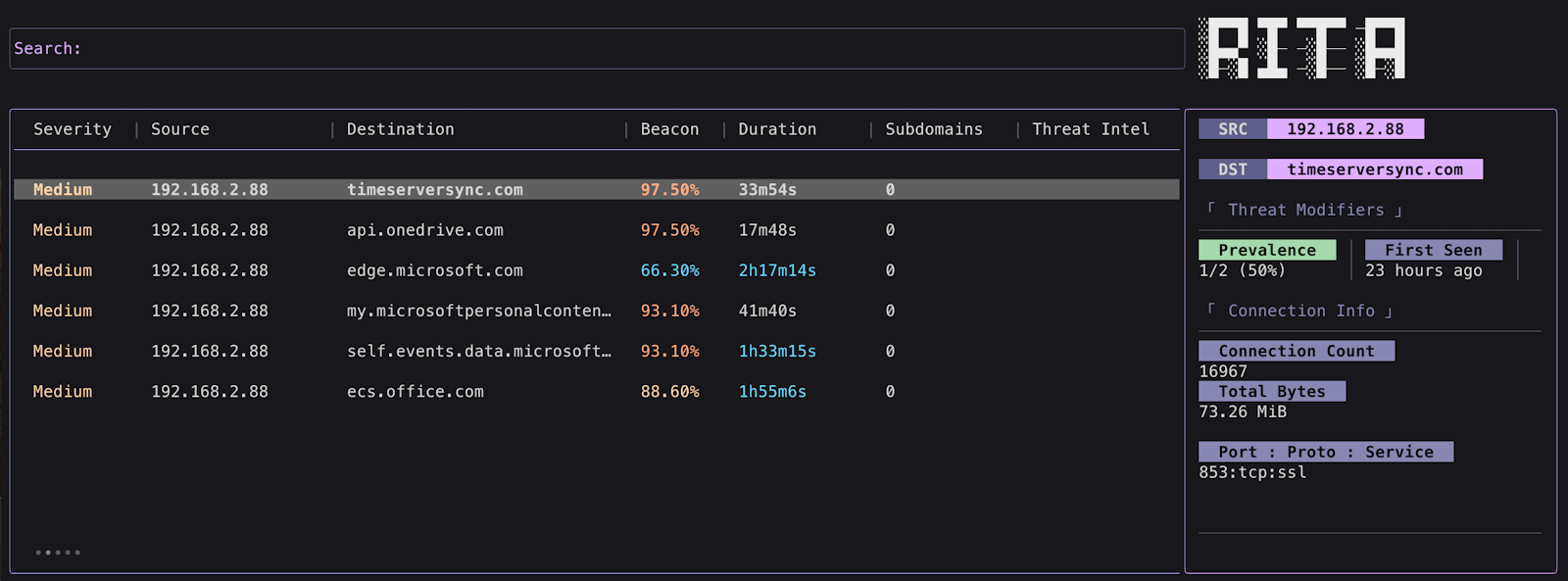
Figure 2. RITA analysis of DoT traffic showing beacon detection on port 853.
With DoT, something interesting happens: we can still see the destination domain. This might seem counterintuitive – isn’t the DNS query encrypted? It is. But the TLS handshake includes Server Name Indication (SNI), which transmits the hostname in cleartext so the server knows which certificate to present. This means timeserversync.com remains visible even though the actual DNS queries are encrypted inside the TLS tunnel.
Notice that RITA no longer classifies this as DNS activity. Without visibility into the query content, it’s treated as a standard TLS connection – and analyzed for beaconing behavior. The beacon score is 97.5%, indicating highly regular connection timing. We see 16,967 connections over 24 hours and 73.26 MB transferred.
The critical giveaway here is the port: 853/TCP. This is the dedicated DoT port, and its presence immediately signals that encrypted DNS is in use. In most enterprise environments, legitimate DoT traffic is rare or nonexistent. An outbound connection to port 853 warrants investigation regardless of what domain it’s connecting to.
So while we’ve lost visibility into the DNS queries themselves – no subdomain analysis, no query count, no entropy calculations – we’ve gained a different detection vector. The unusual port makes DoT conspicuous in a way that plain DNS isn’t.
Network Behavioral Analysis: DNS-over-HTTPS

Figure 3. RITA analysis of DoH traffic showing a single long-duration connection on port 443.
DoH presents differently. Once again, RITA doesn’t see this as DNS – it’s standard HTTPS traffic. The severity is high, but notice what’s missing: the domain name. Unlike DoT where SNI revealed timeserversync.com, here we only see the raw IP address of the C2 server. This is because our DoH implementation connected directly to the server by IP rather than hostname.
The beacon score is 0%. At first glance, this might seem like the malware evaded beacon detection – but look closer. There’s only one connection, and it lasted nearly 24 hours. The agent maintained a persistent HTTPS connection and sent all its beacon check-ins within that single session, never disconnecting and re-establishing the TLS handshake.
This is actually a significant red flag. A 24-hour continuous connection to an unknown IP address is highly anomalous. Most legitimate HTTPS traffic involves shorter-lived connections – web browsing sessions, API calls, periodic syncs. An uninterrupted connection spanning an entire day to an unfamiliar destination warrants immediate investigation.
Even if the malware had employed traditional beaconing – disconnecting and reconnecting with each check-in – detection wouldn’t fundamentally change. It would simply shift from long-connection analysis to beacon analysis. Either way, HTTPS traffic to an unknown, low-reputation destination raises the same questions as any other potential C2 of HTTPS channel. The port (443/TCP/SSL) confirms this is standard HTTPS, blending with normal web traffic.
Network Behavioral Analysis: DNS-over-QUIC

Figure 4. RITA analysis of DoQ traffic showing beacon detection on port 8853/UDP/QUIC.
DoQ shows yet another pattern. Like DoH, the destination appears as a raw IP address rather than a domain name. RITA doesn’t classify this as DNS activity – there’s no subdomain count or DNS-specific analysis.
The beacon score returns at 86.10%, lower than DoT but still indicating regular, automated communication patterns. We see 17,024 connections over the capture period and 137.16 MB of data transferred – a substantial amount of traffic.
The critical indicator is the port and protocol: 853/UDP/QUIC. This immediately identifies the traffic as DoQ. QUIC over UDP on an unusual port stands out in network traffic analysis. The question for any analyst becomes straightforward: what legitimate application would be using DNS-over-QUIC, and why is this host connecting to an unfamiliar IP address using this protocol?
In most enterprise environments, the answer is “nothing legitimate.” DoQ adoption remains limited, and seeing it in the wild – especially to an unknown destination – should trigger investigation.
Diving Into Zeek Logs
RITA and AC-Hunter excel at surfacing behavioral anomalies – beacon patterns, connection counts, unusual ports. But sometimes we need to go deeper. Zeek’s raw logs give us visibility into the actual data, letting us confirm findings and extract details that aggregated analysis can’t provide.
Plain DNS: Full Visibility
With plain DNS, Zeek’s ‘dns.log’ captures everything. Let’s see exactly what the C2 traffic looks like using the command:
cat dns.log | zeek-cut query | grep "timeserversync" | head -10
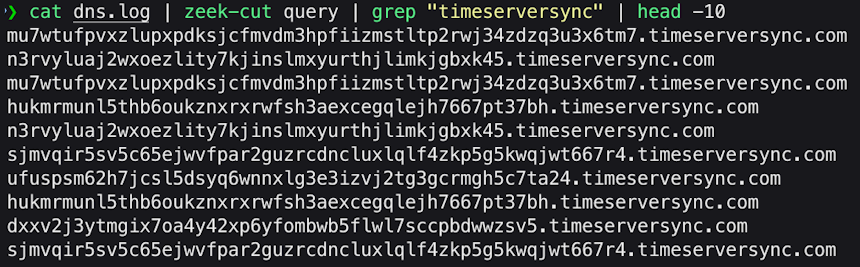
Figure 5. High-entropy subdomains visible in Zeek dns.log for plain DNS C2 traffic.
There it is – the actual encoded data. These long, random-looking subdomain strings are the hallmark of DNS tunneling. Each query carries encoded beacon data in the subdomain portion, and with plain DNS, we see every character.
RITA reported 17,047 unique subdomains for this domain. Let’s confirm that with Zeek:
cat dns.log | zeek-cut query | grep "timeserversync" | sort -u | wc -l

Figure 6. Total query count for “timeserversync” visible in Zeek dns.log for plain DNS C2 traffic.
The numbers match exactly. We can also see the total query volume using:
cat dns.log | zeek-cut query | grep "timeserversync" | wc -l

Figure 7. Total query volume for “timeserversync” visible in Zeek dns.log for plain DNS C2 traffic.
Why 34,092 total entries but only 17,047 unique? Zeek logs both the query and the response as separate entries. This is useful for analysis – we can see not just what was asked, but what was answered.
Subdomain Length Analysis
One detection technique that Zeek enables is subdomain length analysis. Legitimate subdomains are typically short – ‘www’, ‘mail’, ‘api’. Let’s look at the length distribution of our C2 subdomains using the following command:
cat dns.log | zeek-cut query | grep "timeserversync" | awk -F'.' '{print length($1)}' | sort -n | uniq -c | sort -rn | head -10

Figure 8. Subdomain length distribution showing clustering between 45-60 characters.
The subdomains cluster between 45 and 60 characters – far longer than any legitimate subdomain. A query for ‘www.example.com’ has a 3-character subdomain. A query for ‘mail.corporate-domain.com’ has a 4-character subdomain. Subdomains averaging 50+ characters? That’s data encoding, not naming.
This gives us a Zeek-based detection angle: alert on any domain where subdomain lengths consistently exceed a threshold (say, 20 characters). Legitimate services simply don’t generate these patterns.
Encrypted DNS: The Visibility Cliff
Now let’s see what happens when we switch to encrypted protocols. Running the same query against our DoH, DoT, and DoQ datasets:

Figure 9. Total query volume for “timeserversync” visible in Zeek dns.log for DoT, DoH, and DoQ produces the same results – 0.
Zero. Across all three encrypted protocols, ‘dns.log’ contains no trace of our C2 domain. The high-entropy subdomains we saw clearly in plain DNS? Invisible. The 17,047 unique query strings that screamed “tunneling”? Gone.
This is the fundamental challenge of encrypted DNS from a defender’s perspective. The content-based detection that makes plain DNS tunneling relatively easy to spot simply doesn’t work when the queries are encrypted.
DoT: SNI Reveals the Domain
While we can’t see the DNS queries themselves, DoT leaves traces in other Zeek logs. Let’s check ‘ssl.log’:
cat ssl.log | zeek-cut id.resp_p server_name | grep "853" | sort | uniq -c

Figure 10. DoT traffic exposes the domain via SNI in ssl.log.
The domain name reappears – not in DNS logs, but in TLS metadata. Server Name Indication (SNI) is sent in cleartext during the TLS handshake, allowing us to see what domain the client is connecting to even though the actual DNS queries are encrypted.
This confirms what RITA showed us: 16,967 connections to timeserversync.com on port 853. The visibility shifted from ‘dns.log’ to ‘ssl.log’, but the domain remains detectable.
DoH: Maximum Stealth
DoH is different. Let’s check what Zeek sees:
cat ssl.log | zeek-cut id.resp_h id.resp_p server_name | grep "48.217.188.16"

Figure 11. DoH connection shows only the IP address – no domain name in SNI.
The SNI field is empty (‘-‘). Our DoH implementation connected directly to the C2 server by IP address rather than hostname, so there’s no Server Name Indication to analyze. From Zeek’s perspective, this is just an HTTPS connection to an IP address.
But the connection behavior tells a story. Let’s examine ‘conn.log’:
cat conn.log | zeek-cut id.resp_h id.resp_p service duration orig_bytes resp_bytes | grep "48.217.188.16"

Figure 12. DoH conn.log showing a single 24-hour persistent connection.
One connection. 86,389 seconds – that’s 24 hours. This confirms what RITA flagged: the DoH agent maintained a single persistent HTTPS session for the entire capture period, sending all its beacon traffic within that one connection.
A 24-hour continuous connection to an unknown IP stands out even without knowing what’s inside it. Most legitimate HTTPS sessions are measured in seconds or minutes, not days.
DoQ: Protocol Fingerprinting
DoQ traffic appears in Zeek’s ‘conn.log’ with a distinctive signature:
cat conn.log | zeek-cut id.resp_h id.resp_p proto service | grep "48.217.188.16" | sort | uniq -c

Figure 13. DoQ traffic identified as QUIC protocol on UDP port 853.
Zeek identifies the service as ‘quic’ – the protocol itself is fingerprinted even though the content is encrypted. Combined with the unusual port (853/UDP), this creates a clear detection signature.
DoQ also generates entries in Zeek’s ‘quic.log’, providing additional metadata about QUIC-specific parameters like connection IDs and version negotiation. This protocol-level visibility gives defenders another angle for detection and investigation.
Zeek Analysis Summary
The pattern is clear: as we move from plain DNS through the encrypted variants, visibility shifts from content-based (‘dns.log’) to metadata-based (‘ssl.log’, ‘conn.log’). Plain DNS gives us everything. DoT trades query visibility for SNI exposure. DoH eliminates both but creates behavioral anomalies. DoQ exposes itself through protocol fingerprinting.
What Zeek confirms is that behavioral detection remains viable even when content inspection fails. The raw logs let us verify what RITA surfaces, dig into specific connections, and build custom detection logic based on the unique characteristics of each protocol.
Endpoint Telemetry: What Sysmon Reveals
Network analysis tells us what’s happening on the wire, but it can’t tell us which process on the endpoint is responsible. This is where Sysmon shines – it bridges the gap between network traffic and the executable generating it.
Process Attribution
The most valuable insight Sysmon provides is process-to-network correlation. When we see suspicious traffic to an unknown IP, Sysmon’s Event ID 3 (Network Connection) tells us exactly which executable initiated it.
In a real investigation, we’d start with a suspicious IP identified through network analysis. Let’s query for all network connections to our C2 server at 48.217.188.16:
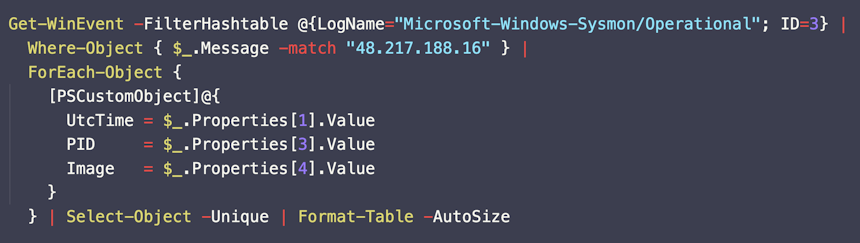
Figure 14. Sysmon query to filter Event ID 3 (network connection initiation) for process attribution.

Figure 15. Sysmon Event ID 3 filtered by destination IP showing process attribution.
Now we know: the traffic to 48.217.188.16 originates from ‘OneDriveSync.exe’ running from the user’s AppData\Roaming folder. That’s immediately suspicious – the real OneDrive executable lives in ‘AppData\Local\Microsoft\OneDrive’, not Roaming.
Across our four test runs (each captured separately), Sysmon identified these processes:
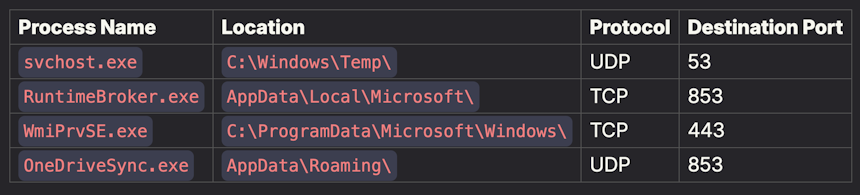
Figure 16. Process attribution across all four DNS protocols.
Every one of these raises red flags:
- svchost.exe in Temp: The real svchost.exe lives in ‘C:\Windows\System32’, never in Temp
- RuntimeBroker.exe in AppData: Legitimate RuntimeBroker runs from System32
- WmiPrvSE.exe in ProgramData: Real WMI Provider Host runs from System32
- OneDriveSync.exe in Roaming: OneDrive binaries live in AppData\Local
This is the power of endpoint telemetry: even when network content is encrypted, the process making those connections can’t hide its location on disk.
The Missing DNS Queries
Sysmon’s Event ID 22 logs DNS queries made through the Windows DNS resolver. Let’s check what it captured:

Figure 17. Event ID 22 returns zero results – encrypted DNS bypasses Windows DNS logging.
Zero DNS query events. This is significant: all four of our agents – including the plain DNS variant – contacted the C2 server directly rather than going through the Windows DNS resolver. The encrypted DNS protocols (DoH, DoT, DoQ) by design bypass the system resolver entirely. They implement their own DNS client that speaks directly to external resolvers.
This creates a detection opportunity: a process making numerous outbound connections (Event ID 3) but generating zero DNS queries (Event ID 22) warrants investigation. Legitimate applications typically resolve domains through the system resolver before connecting.
Detection and Prevention Strategies
Our analysis reveals a clear hierarchy of detectability. Rather than treating all encrypted DNS equally, we can build layered defenses that address each protocol’s unique characteristics.
DoT and DoQ: Block at the Perimeter
These protocols use dedicated ports – 853 for DoT (TCP) and 853 or 8853 for DoQ (UDP). This makes them trivial to block at the firewall:
iptables -A OUTPUT -p tcp --dport 853 -j DROP

iptables -A OUTPUT -p udp --dport 853 -j DROP

iptables -A OUTPUT -p udp --dport 8853 -j DROP
Most enterprises have no legitimate need for DoT or DoQ traffic. Blocking these ports forces applications to fall back to plain DNS or existing corporate DNS infrastructure – which is exactly what you want. Legitimate privacy-conscious applications (browsers, operating systems) will gracefully degrade to traditional DNS if encrypted variants are unavailable.
DoH: Block Known Resolvers
Blocking port 443 isn’t an option – too much legitimate traffic depends on it. Instead, focus on known DoH resolver infrastructure.
The curl project maintains a comprehensive list of public DoH servers. Then Block or alert on connections to these known DoH endpoints, for example:
- `dns.google` (8.8.8.8, 8.8.4.4)
- `cloudflare-dns.com` (1.1.1.1, 1.0.0.1)
- `dns.quad9.net` (9.9.9.9)
- `doh.opendns.com`
- `dns.nextdns.io`
For comprehensive coverage, import these lists into your firewall, proxy, or SIEM. Update regularly – new resolvers appear frequently.
The Custom C2 Problem
Blocking public resolvers doesn’t help when attackers run their own DoH infrastructure – like we did in this simulation. Our C2 server wasn’t Cloudflare or Google; it was a custom authoritative nameserver accepting DoH queries.
This scenario collapses into generic HTTPS C2 detection. The traffic looks like any other HTTPS connection to an unknown server. Your defenses become:
Reputation-based filtering:
- Domain age (newly registered domains are suspicious)
- IP reputation (hosting providers, ASN reputation)
- Certificate transparency logs (when was the cert issued?)
Behavioral analysis with RITA/AC-Hunter:
- Beacon detection (regular connection timing)
- Long connection analysis (persistent sessions)
- Data volume asymmetry (C2 often has specific upload/download patterns)
This is where the encryption argument comes full circle. An attacker can hide DNS queries inside HTTPS, but they can’t hide the fact that their endpoint is making regular connections to an unfamiliar destination. Behavioral analysis catches what content inspection cannot.
Enforce Local DNS Resolution
One often-overlooked control: force all DNS traffic through your local resolver. Configure endpoints to use internal DNS servers and block outbound DNS (UDP/TCP port 53) to external destinations.
This doesn’t prevent encrypted DNS – a determined attacker can still use DoH over 443 – but it creates friction. Applications expecting plain DNS will use your resolver, where you have visibility. Malware specifically implementing encrypted DNS stands out as anomalous.
iptables -A OUTPUT -p udp --dport 53 ! -d 10.0.0.1 -j DROP

iptables -A OUTPUT -p tcp --dport 53 ! -d 10.0.0.1 -j DROP
Conclusion
We started this investigation with a simple question: what can we see when DNS goes encrypted? The answer, it turns out, is “more than you might expect.”
Plain DNS gives us everything – full query content, subdomain entropy, query volume, response data. The 17,047 unique subdomains in our plain DNS dataset screamed “tunneling” through every analysis lens we applied.
DoT trades content visibility for protocol conspicuousness. We lose the query strings but gain a dedicated port that has no business appearing in most enterprise environments. The domain remains visible through SNI, and the unusual port makes detection straightforward.
DoQ follows a similar pattern. Protocol fingerprinting reveals it as QUIC traffic on an unusual port. While query content is hidden, the transport choice itself becomes the indicator.
DoH represents the true challenge. Queries hide inside standard HTTPS traffic. With SNI encryption or direct-IP connections, even the destination domain disappears. This is as stealthy as encrypted DNS gets – and yet, behavioral analysis still catches it. A 24-hour persistent connection to an unknown IP, or regular beacon patterns to a low-reputation destination, raises the same red flags regardless of what’s encrypted inside.
The broader lesson extends beyond DNS. Encryption doesn’t make traffic invisible – it shifts detection from content to behavior. Attackers can encrypt payloads, but they can’t encrypt patterns. Regular timing, unusual destinations, rare protocols and ports, abnormal volumes, persistent connections – these characteristics survive encryption intact.
This is why tools like RITA and AC-Hunter remain effective even as encrypted protocols proliferate. They don’t care what’s inside the packets. They care about connection graphs, timing distributions, and statistical anomalies that distinguish automated C2 from human-generated traffic.
Encrypted DNS isn’t the end of network visibility. It’s a shift in what we look for. The queries may be hidden, but the connections still happen. The patterns still emerge. And with the right tools and techniques, we can still find them.
Happy Hunting!
Faan
Capture Files
PCAPs
Because… PCAPs, or it didn’t happen. 😊
The following PCAP files are packet captures taken from the same lab environment over a 24-hour time frame. The files were generated using Wireshark from the target host and include normal Windows OS traffic and normal network broadcast traffic. They have not been edited. The PCAPs are safe, standard PCAP files and do not include any actual malware.
DNS Comparison Plain DNS C2 24 Hour Capture
plain_dns_c2_24h.pcapng
File Size: 396.3 MB
SHA-256 Checksum: 44145081E88E70E1B9977932AA96B48B54C53CC1EF9B872446FE44CAAFE3FD4A
DNS Comparison DoT C2 24 Hour Capture
dot_c2_24h.pcapng
File Size: 398.9 MB
SHA-256 Checksum: 8109696AAD0F777F69D3B06125CB3FC42CF5F4116324685A3AF137C40BF60981
DNS Comparison DoH C2 24 Hour Capture
doh_c2_24h.pcapng
File Size: 260.9 MB
SHA-256 Checksum: B4E55EC9DF8600AB6A3226E1C5B8FFDBD79A1ADD104110A218BDCC8F15A70634
DNS Comparison DoQ C2 24 Hour Capture
doq_c2_24h.pcapng
File Size: 376.0 MB
SHA-256 Checksum: F18C60C83A8B4C7C10E301B5D9BC1B344F1A47B15570E7D03C41BCABD4066464
Zeek Logs
If you are an AC-Hunter or RITA user, we are providing the 24-hour Zeek logs for you to import directly into AC-Hunter or RITA. The following Zeek Logs have been taken from the same lab environment over a 24-hour time frame and include normal Windows OS traffic and normal network broadcast traffic. They have not been edited. The Zeek logs are safe, standard log files and do not include any actual malware.
Importing Zeek logs into AC-Hunter or RITA example:
ssh into your AC-Hunter or RITA server and upload all the Zeek logs contained in a zip file below (all files that have the ‘.log’ extension) into a temporary directory on the server. In this example, we are uploading the Zeek logs into /tmp/zeek_plain_dns_c2_24h/
Then run the following command:
For AC-Hunter v6.x and RITA v4.x and earlier:
rita import /tmp/zeek_plain_dns_c2_24h/*.log zeek-plain-dns-c2-24h
For RITA v5.x+:
rita import --logs=/tmp/zeek_plain_dns_c2_24h/*.log --database=zeek-plain-dns-c2-24h
You will now have a new database in the AC-Hunter UI/web interface or RITA CLI titled “zeek-plain-dns-c2-24h” you can select and view. (repeat the process for importing additional Zeek logs and creating new databases by changing the directory and database names accordingly)
DNS Comparison Plain DNS C2 24 Hour Zeek Logs
plain_dns_c2_24h.zip
Size: 2.3 MB
SHA256 Checksum: 9A9F2A503A822B7A19B9CC2595F43674629180FCBE305D2B83CD20EF272FAC36
DNS Comparison DoT C2 24 Hour Zeek Logs
dot_c2_24h.zip
Size: 1.2 MB
SHA256 Checksum: F826373174EE7360B3347EF241FBA9E125AE68F21155A4191ECED4743DD810A4
DNS Comparison DoH C2 24 Hour Zeek Logs
doh_c2_24h.zip
Size: 327.6 KB
SHA256 Checksum: 9A29E48B3F33D31586F96C2C8C2F64FA257D14771CD98528B9A2CD186CBF055A
DNS Comparison Plain DoQ C2 24 Hour Zeek Logs
doq_c2_24h.zip
Size: 2.1 MB
SHA256 Checksum: 06ADCFE74391A4DEB9DAC232BA05091E588E62977ACC5345F4BF92BD98092B0C
Discussion
Want to talk about this or anything else concerning threat hunting? Want to share how good (or not so good) other detection tools were able to detect these samples?
You are welcome to join our Discord server titled “Threat Hunter Community” to discuss topics surrounding threat hunting. We invite you to join our server here.

Faan is a security researcher specializing in detecting post-exploitation malware, with a focus on network communication. He likes exploring threat hunting via a purple team approach by simulating adversarial activity to develop novel threat hunting detections. He also loves building covert channels and unusual malware communication methods, creating threat emulation tools that inform new detection vectors.