DNS Packet Inspection for Network Threat Hunters

Introduction
When we as network threat hunters think of Command and Control (C2) over DNS, a familiar image comes to mind: long, garbled subdomains streaming out of a network. This being the case, when these channels operate for any significant period of time, they tend to accumulate a substantial amount of “unusual” subdomains.
So when we look at DNS traffic on our networks and encounter some unheard-of domain, let’s say xx1-derp.com, with thousands of unique, encoded subdomains, we can be sure we’ve found something sus. Indeed, this is how RITA and AC-Hunter make quick work of identifying C2 over DNS communication on our network.
This “easy to spot” pattern is a consequence of the fact that DNS, by its nature, is not designed for high-bandwidth data transfer. So when threat actors perform activities requiring the transfer of relatively large amounts of data – say exfiltrate a file – then the C2 agent has to chunk the data into countless small pieces, encoding each one as a subdomain in a DNS query. The result is a noisy, conspicuous pattern that’s hard to miss against the backdrop of normal DNS traffic.
But DNS Misuse Ain’t No One-Trick Pony
But in this regard, I’ve noticed a complacency creep in, at least in myself. There’s a sense that, since DNS tunneling is so easy to spot via this accumulation of garbled subdomains, that it’s not something to dedicate too much mental RAM towards. It’ll almost reveal itself, if we pay it but the minimum amount of attention.
But believing that all DNS abuse looks like this pattern of accumulated subdomains is a critical oversight. Today there are numerous, far-more-subtle ways in which DNS can be leveraged to serve threat actor’s goals. Though the techniques vary, the overall theme is that threat actors, instead of relying on DNS to do everything required of a C2 agent, avoid using it for what it’s bad at – bulk data transfer – and instead for what it’s exceptionally good at: quiet, reliable, and stealthy communication.
The Power of the DNS Heartbeat
As I discussed in our previous article on Multi-Modal C2 Communication, sophisticated malware does not rely on a single protocol for agent communication. Savvy malware designers leverage a variety of protocols for different tasks, choosing the right tool for the right job.
So while DNS is a poor choice for transferring large payloads, it is arguably the perfect channel for a C2 heartbeat – the regular, periodic check-in from an agent to its C2 server to ask, “Do you have a new task for me?”
Why is DNS so effective for this purpose?
- Ubiquity: DNS traffic is everywhere: every network relies on it, and it’s so voluminous that a small, intermittent C2 check-in can easily get lost in the noise.
- Trust: DNS is fundamental to network operations. Security appliances and firewalls are typically configured to allow DNS traffic with minimal inspection to avoid breaking critical services.
- Recursive Resolution as a Proxy: An agent doesn’t need to connect directly to the C2 server. It can send a query to the local, trusted DNS resolver, which then does the work of reaching out to the internet. This outbound communication from a trusted internal server faces far less scrutiny.
- Decentralization and Resilience: DNS is an inherently distributed and redundant system. This provides a robust and resilient infrastructure for C2, if one resolver fails the agent can try another, or even attempt a direct connection to the C2 server fronting as the authoritative nameserver.
A smart malware designer understands these strengths. They can use DNS for its primary advantage: stealthy check-ins. Then, once bulk data transfer, or rapid interaction with the target endpoint is desired, the agent can switch over to another protocol better suited for that job like HTTPS, or even Websocket. By leveraging different properties and combining protocols to optimize their individual strengths in a C2 agent, an adversary can have the best of both worlds.
Avoiding Garbled Subdomains Altogether
A potential question lingering in the mind of the reader might be – well, won’t this multi-pronged approach that uses DNS for the heartbeat still accumulate unique subdomains? Perhaps they’ll accumulate at a slower rate, but surely they’ll still accumulate? The answer is: not necessarily.
The only reason for using unique subdomains in this scenario is to avoid caching issues with the local resolver, i.e. to ensure the message still finds its intended target. But to this there are two solutions. If a heartbeat with a relatively short delay is required, then of course the agent can simply attempt to connect to the authoritative nameserver (i.e. the C2 server) directly.
But, since that’s sure to draw more attention, a measured threat campaign might employ a “low and slow” communication style, and then have the DNS response return with a low TTL value. Now many local resolvers will ignore ludicrously low values like 60 seconds and overwrite it with their own minimum, but as long as the agent is patient enough this won’t be an issue.
Besides, the DNS response of course indicates whether it’s originating from the authoritative server, meaning an agent is capable of detecting whether they are receiving a cached response and should be able to adapt accordingly by for example employing an exponential backoff pattern in beacon delay.
Broadening Our Threat Hunting Horizons
All this to say: to evolve as network threat hunters we need to unshackle ourselves from this one-dimensional approach as far as DNS misuse is concerned. That is not to say that looking for the accumulation of unique subdomains is not important – it absolutely is. Rather, by adding a few more conceptual tools to our armamentarium, we’ll be much better equipped to snuff out DNS abuse both simple and complex.
The goal of this article is thus to explore a number of these more nuanced techniques to empower you to recognize them in DNS traffic. We’ll first look at a number of actual case studies, to see how they’ve been used in actual attacks.
Then I’ll share a tool that will allow us to inspect DNS traffic, as well as generate suspicious looking packets ourselves, so we can get some direct experience with identifying potential DNS misuse.
SUNBURST
Now there are so many design innovations in SUNBURST, we could easily dedicate an entire blogpost to dissecting these. However, what I want to communicate here is really the overall, multi-stage design of the C2 agent.
First, the agent communicates “low and slow” using only DNS to check-in. And unlike traditional DGAs that generate a flood of pseudo-random domains, SUNBURST’s algorithm generates a single unique subdomain for each victim machine, encoding specific host identifiers. This meant only one unique subdomain per host, completely bypassing detection methods that look for a high volume of unique subdomains.
The true genius of SUNBURST is however in its activation sequence to transition from the DNS to HTTPS channel. To escalate to the interactive C2 stage, a precise, two-step process is required:
- The implant sends its DNS query. The first response had to be a DNS A record resolving to an IP address within a specific “pre-activation” subnet (e.g., 184.72.0.0/15).
- Immediately following this, the next DNS response for the same FQDN had to contain a CNAME record. This CNAME record would point to the domain of the second-stage C2 server.
If this sequence is not perfectly met, the agent remains dormant. This multi-stage handshake ensures that the attackers only activates the full interactive C2 on high-value, vetted targets, minimizing their risk of discovery. The DNS response wasn’t just data, it was a direct, semantic command: “Wake up and connect here.”
In this regard SUNBURST signifies a true paradigm shift in DNS C2 – it moves beyond using the DNS response as a simple container for data and instead uses the semantic meaning of the response itself as a command. This creates a “shorthand notation,” where a small amount of data can convey a complex instruction. This is the foundation of a state machine, where the agent transitions between different states based on the signals it receives from the C2 server.
The DNS Sandwich
This novel technique, detailed by security researcher Spencer Walden, represents a direct attempt to evade security monitoring and logging systems that are configured to only parse and record the most common and expected fields of a DNS packet. Instead of placing session data in the highly visible and frequently logged subdomain, it repurposes other, less-scrutinized fields within the DNS header and query structure itself.
The technique’s name derives from its method of “sandwiching” data into unconventional parts of the DNS packet. It relies on crafting what the author terms “wacky requests” – packets that are technically valid according to RFC specifications, but semantically abusive and highly anomalous in real-world traffic. Specifically, it repurposes two often-overlooked fields to imbue them with alternative semantic meaning.
First is the three reserved “Z” bits in the DNS header. According to RFC 1035, these bits “must be zero” in all queries and responses. As a result, most security middleboxes and DNS servers ignore them completely. In other words, they “should” be 0, but can be any value between 0 and 7 inclusive without anyone or anything batting an eye.
In the case of the original technique the author proposes repurposing the Z-value as an End-of-Stream (EOS) marker. So when transmitting a large payload that must be fragmented across multiple DNS packets, all packets in the stream will have Z set to 0, whereas the final packet of the message will have the Z set to 1.
However as mentioned above in the SUNBURST example, any semantic meaning can be assigned here. Attackers can use these three bits to communicate up to eight different values, once again allowing for the creation of a simple, but effective state machine. For example:
- Z = 0: “Continue beaconing.”
- Z = 1: “Switch to HTTPS C2.”
- Z = 2: “Download new stage from A record IP.”
- Z = 3: “Go dormant for 24 hours.”
- etc.
The second field described by DNS Sandwich is the qclass (Question Class) Field. It’s a field that almost always has the exact same value – 1 for IN (Internet). Because of this, it’s also often ignored since it’s seen as “not really communicating anything”. And that complacency is once again an opportunity for an attacker.
The Sandwich technique proposes repurposing this field as a message sequence number. Since the field is 16 bits wide, it can represent numbers from 0 to 65,535. This provides a high-capacity mechanism for numbering fragmented data chunks, allowing for the reliable reassembly of large payloads (conservatively up to 15 MB) sent over connectionless and potentially out-of-order UDP packets.
In other words, it can be co-opted to provide reliability for an unreliable protocol. But again, this is the specific function this author proposed and there is no reason why other meanings cannot be assigned to this 16-bit field.
The point for us defenders in both cases is not even necessarily what it’s being used for, but really is it being used at all? Any DNS communication with Z values other than 0, or qclass fields other than IN, should immediately be scrutinized.
Joker ScreenMate
The final case study I’d like to review is that of Joker ScreenMate, where the malicious binary itself was hosted as a series of DNS TXT records. DNS TXT records are used to store arbitrary text-based information associated with a domain. They are commonly used for verifying domain ownership to third-party services and for implementing email authentication policies like SPF, DKIM, and DMARC.
Because DNS TXT records can hold arbitrary text and are less restricted in format than other record types, threat actors frequently abuse them to create a covert channel for transferring malicious data. Specifically in the case of Joker ScreenMate, the nuisanceware’s binary was hosted by first hex-encoding the binary, and then chunking it across 100s of TXT records. A C2 agent could then retrieve all the chunks through a series of DNS requests, reassemble them, and decode them back into an executable format.
Though fairly simple and ingenious, the technique does have a number of strong tells:
- A high number of different TXT records from the same domain is unusual.
- Multiple TXT records from the same domain that all use the total capacity of the TXT record’s RDATA field is unusual.
- Multiple TXT records from the same domain that contain encoded data is unusual.
Given this, if we know what to look for, and how to look for it, we should theoretically be able to detect it.
Now that we’ve discussed a number of techniques and case studies where threat actors abuse DNS beyond generating high numbers of unique subdomains, I’d like to share a tool I’ve created that can help us inspect DNS traffic to potentially flag some of these.
Introducing DNS Packet Analyzer
As we’ve now seen, to detect many of these more advanced techniques we have to move beyond surface-level analysis of DNS traffic and look at the values of certain fields. To help with this I’ve created the wholly creatively-titled tool DNS Packet Analyzer.
You can find the full source code, installation steps, and usage instructions in this GitHub repository. I encourage you to take a moment to install it so you can follow along in the remainder of this article.
The toolkit has two main components:
- Analyzer: An interactive terminal-based tool that allows you to load a PCAP file and perform a deep analysis of every DNS packet it contains. It highlights anomalies and provides a detailed breakdown of each packet’s structure.
- Crafter: A tool that allows you to build custom DNS packets from a simple YAML configuration file. You have full control over every header field, including the Z-bits, allowing you to generate your own test traffic and validate security controls.
This combination allows you to both hunt for threats in existing traffic and generate test packets to validate your detection capabilities.
For the remainder of this article, let’s use the tool to hunt for the types of threats we’ve just discussed. I’ll show you exactly what to look for and how the tool helps you find it. Once again, I won’t provide detailed instructions on the tool’s usage here, so please acquaint yourself with it in the GitHub repository before proceeding to the next section.
Generating Traffic
To generate traffic to analyze (in *.pcap format), you can use your preferred tool such as tcpdump, T-shark, or WireShark to generate a trace file. Since DNS is such a noisy protocol, running it for a few minutes should generate dozens of request-response pairs.
However since hopefully most of the DNS traffic on our network should be benign with nothing out of the ordinary, I suggest you use the crafter application (included in the tool) to generate some unusual traffic by running go run ./cmd/crafter from the root directory.
It is currently set up to run a specific configuration file (var pathToYamlFile = “./cmd/crafter/sus_txt_resp.yaml”) that will combine all the various anomalies we’ve discussed in a single DNS response packet.
Feel free to play around with the config files and change values to generate different, unusual traffic.
Running Our Analyzer
Once we’ve generated and saved our trace file we can run it using go run ./cmd/analyzer -pcap <path-to-pcap-file>.
You will see a list of all the DNS packets found in the trace file, organized as can be seen in the image below.
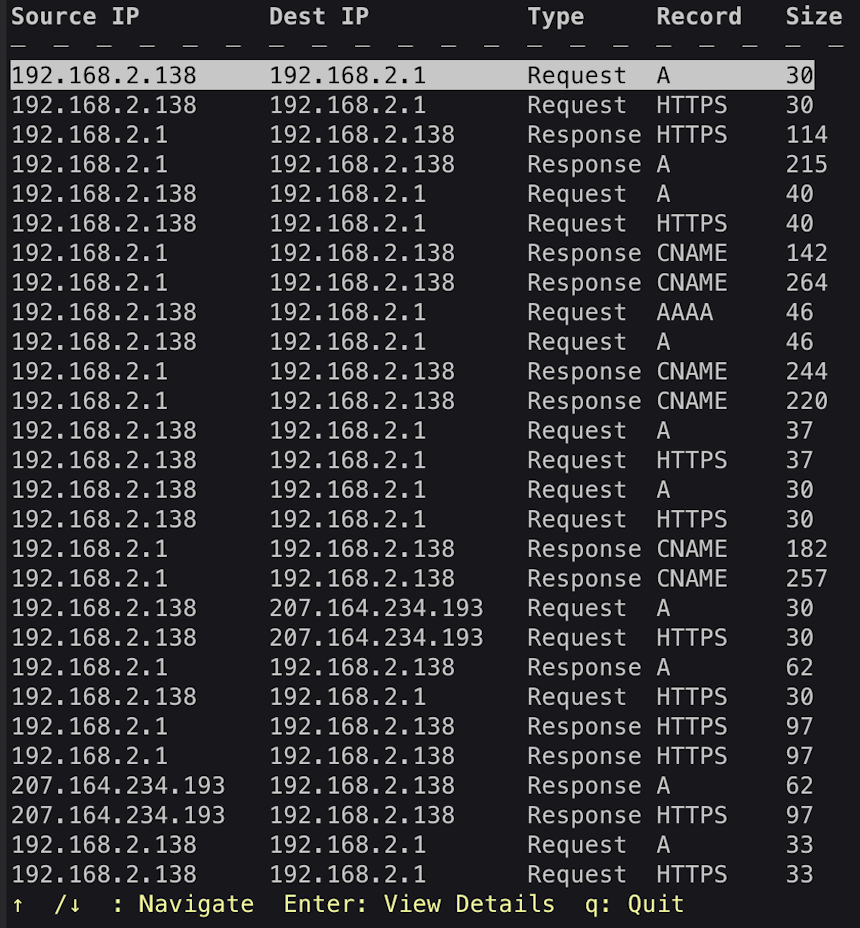
We can use the up and down arrow keys to select our packet of interest, and hit enter to see more details. When we open the TXT Record response generated by the included YAML-config titled sus_txt_resp.yaml, we’ll see the following:
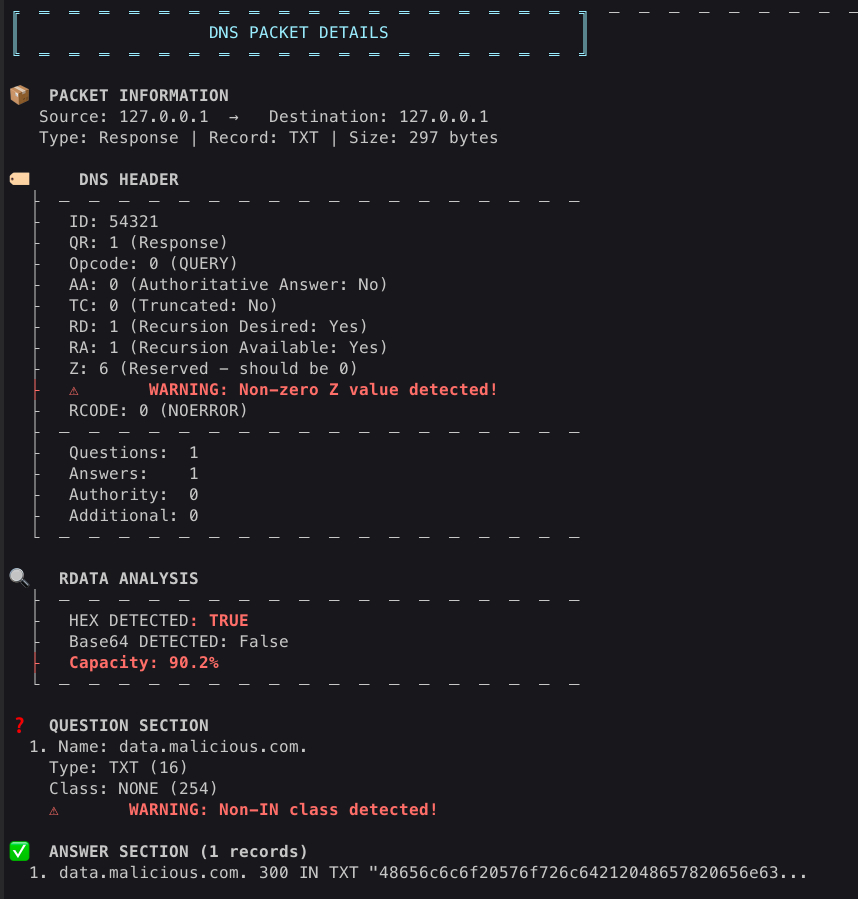
Here we can see a complete breakdown of the packet contents. At the top we can see the source IP, destination IP, packet type (request or response), record type (for example A, MX, TXT etc), and size.
Below this we have the DNS Header. Let’s quickly go through each field:
- ID (Transaction ID): A 16-bit random identifier used to match responses with queries. While typically random, some C2 channels might use predictable or sequential IDs as another low-bandwidth communication channel.
- QR (Query/Response): A single bit that’s 0 for a query and 1 for a response.
- Opcode: A 4-bit field specifying the kind of query. The vast majority of DNS traffic will have an opcode of 0 (a standard QUERY). Other values, like IQUERY (inverse query) or STATUS, are rare and could be worth investigating.
- AA (Authoritative Answer): This bit is set in a response if the responding server is an authority for the queried domain.
- TC (Truncated): Indicates that the message was truncated because it was larger than the 512 bytes allowed for UDP. A legitimate flag, but could also be used maliciously to force a client to retry over TCP, potentially bypassing certain security controls.
- RD (Recursion Desired): Set in a query to ask the DNS server to perform recursion. This is almost always set to 1 in legitimate client queries. A query with RD=0 from a client machine could be suspicious.
- RA (Recursion Available): Set in a response to indicate that the server supports recursion.
- Z (Reserved): These three bits are reserved for future use and, per the RFC, must be zero. As we discussed with the DNS Sandwich technique, any non-zero value here is highly anomalous and a strong indicator of a potential covert channel. Our tool will automatically flag this with a prominent warning, as seen in the screenshot above.
- RCODE (Response Code): A 4-bit field indicating the status of the response. 0 (NoError) and 3 (NXDomain) are the most common. Other codes, like ServFail, Refused, or unassigned codes, could be used as part of a C2 signaling scheme, though many middleboxes might drop unusual values, making this a less viable option.
Note that I’m not a big proponent of rote memorization and consumption of RFCs for the sake of it, but really as a network threat hunter I view the DNS Header as having so much untapped potential for abuse by threat actors. As a consequence I suggest you really become acquainted with each field. I believe you should be able to look at a DNS header, understand exactly what it’s communicating, and more importantly recognize when things “don’t make sense”.
The thing that should obviously stand out to us in this case is the unusual Z-value of 6, which the application will highlight with a red warning message.
Below the DNS Header we have the RDATA Analysis. This is not an actual section of a DNS packet, rather it’s an analysis our tool will perform for DNS responses containing TXT Records to flag potentially suspicious indicators, including:
- Hex Detected: The analyzer inspects the content of the TXT record. If it appears to be a long string of hexadecimal characters, it flags it as TRUE.
- Base64 Detected: Similarly, it checks for patterns that indicate Base64 encoding. Legitimate services (like DKIM) use TXT records with Base64, but in the context of other suspicious indicators, it can be a sign of C2.
- Capacity: This is a crucial indicator. The analyzer calculates what percentage of the TXT record’s maximum capacity is being used. A record that is almost completely full (90%+) is highly suspicious and will be flagged in red. It suggests that an automated process is trying to cram as much data as possible into each record, a classic sign of data chunking for exfiltration.
Finally, in our Question Section we can see that the Question Class was not IN (Internet) as we almost always expect, but rather NO (None). As we learned in the DNS Sandwich, oft-ignored fields like Z and qdata can be abused to communicate custom semantic meanings.
This concludes a brief overview of the tool and some things to look out for. Please download the tool, load up your own PCAP files, and start hunting. Look for the non-zero Z-values. Scrutinize those TXT records. Question every field. The threats are out there, hiding in the noise.
Evolve Your Hunt
The landscape of network threats is constantly evolving. As defenders, we must evolve with it. Relying solely on the old signatures of DNS abuse, like a high volume of unique subdomains, is not enough. You might catch all the script kiddies, but today’s advanced adversaries are playing a more subtle game, using the trusted and ubiquitous nature of DNS to hide their communications in plain sight.
By moving beyond simple data transfer and using the semantic meaning of DNS responses as commands, attackers can create stealthy and resilient C2 channels that are difficult to detect with traditional methods. Techniques like the SUNBURST activation sequence and the DNS Sandwich’s abuse of the Z-bits require us to look deeper, to inspect the very fabric of the DNS packets themselves.
This is where something like DNS Packet Analyzer, or your own detection scripts, can come in handy. We need tools to empower us to perform deep inspection, to peel back the layers of the protocol and find the anomalies that others ignore. By understanding what a normal DNS packet looks like, field by field, you can begin to spot the subtle deviations that might signal a compromise.
Live Long and Prosper,
Faan

Faan is a security researcher specializing in detecting post-exploitation malware, with a focus on network communication. He likes exploring threat hunting via a purple team approach by simulating adversarial activity to develop novel threat hunting detections. He also loves building covert channels and unusual malware communication methods, creating threat emulation tools that inform new detection vectors.