Malware of the Day – Multi-Modal C2 Communication – Numinon C2
What is Malware of the Day?
Lab Setup
Malware: Custom Go-based C2 (Numinon)
MITRE Tactics: TA0011 Command and Control, T1071.001 Application Layer Protocol: Web Protocols, T1573 Encrypted Channel, T1571 Non-Standard Port
Traffic Type: HTTPS (HTTP/1.1, WebSocket)
Connection Type: TCP
C2 Platform: Custom Go-based C2 (Numinon)
Origin of Sample: Active Countermeasures Threat Hunting Lab
Host Payload Delivery Method: Malicious Macro
Target Host/Victim: 192.168.2.115 (Windows x64)
Adversary Host: 64.23.212.29 (Ubuntu Linux)
Beacon Timing: Phase 1: 10s, Phase 3: 180s
Jitter: Phase 1: 20%, Phase 3: 50%
Malware of the Day Mission
To identify and share examples of post-compromise network activity in order to better detect and respond to potential network threats. Specifically we are looking for Command and Control (C2) communication channels used by attackers to obtain intelligence, issue commands, and exfiltrate data through a compromised host or hosts.
Background
In our “Malware of the Day” series, we have explored a variety of C2 network communication profiles, covering protocols like HTTP, HTTPS, DNS, ICMP, and NTP. Most of these simulations were “unimodal” – meaning the period between subsequent agent check-ins followed a single pattern. Even with jitter introducing some randomization, the core delay and jitter values remained constant, ultimately leading to a single “mode” or peak on a connection timing histogram – see Image 1 below.
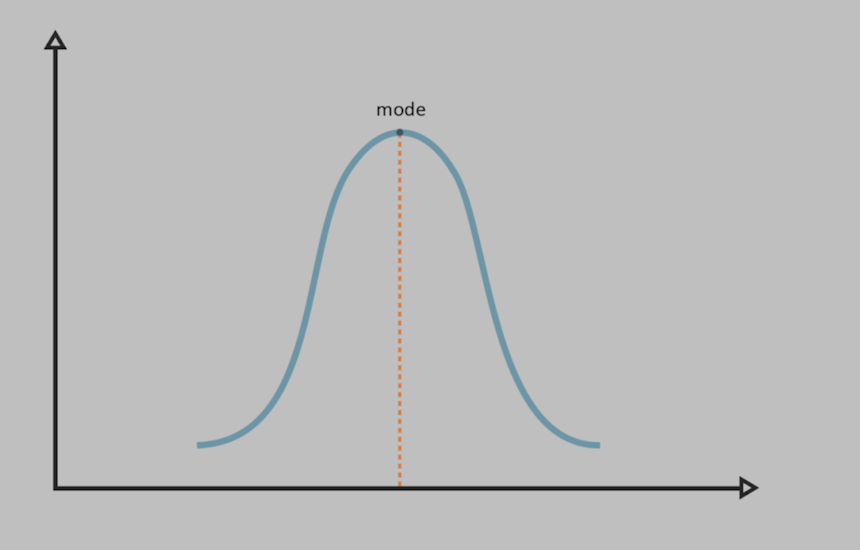
Image 1. Simplified representation of a unimodal C2 agent network communication profile.
While these focused simulations are valuable for understanding fundamental principles, many real-world compromises do not limit themselves to a single communication profile. Attackers are not required to use only one protocol, port, or beaconing configuration. In fact, they can gain significant advantages by dynamically varying their communication profiles.
I will refer to this capability as Multi-Modal C2. A C2 framework can be considered multi-modal if it can alter its communication characteristics such as protocol (for example HTTP vs. DNS), timing (delay and/or jitter), or connection state (beaconing vs. persistent) within the same session to serve different operational goals. This adaptability allows attackers to switch between different “modes” of operation based on their immediate needs.
The strategy of combining network communication profiles is not new and has been observed in many sophisticated malware campaigns. For example, Sunburst, the backdoor used in the SolarWinds supply chain attack, famously used DNS for its initial, stealthy “heartbeat” check-ins. Once it identified an interesting target, it would switch to a more robust HTTPS channel for command execution and data transfer.
The C2 Paradox: Stealth vs. Operational Efficiency
From an attacker’s perspective, designing a C2 agent’s network communication profile involves a fundamental trade-off between stealth and operational efficiency.
- Stealth-Optimized Mode: A “low and slow” beaconing profile, characterized by a long delay (minutes or even hours) and high jitter, generates very little network noise. This makes the C2 traffic difficult to distinguish from legitimate, infrequent background traffic, thus lowering the probability of detection. However, this approach is extremely inefficient for an active operator. Waiting several minutes for a single command to execute or for a large file to be exfiltrated in small chunks is impractical.
- Efficiency-Optimized Mode: Conversely, a rapid beaconing interval (seconds) or a persistent, stateful connection (like a WebSocket) allows for near-real-time interaction and efficient, high-bandwidth data transfer. An operator can execute commands and receive output almost instantly. This efficiency, however, comes at the cost of increased risk.
Dynamic Updates: The Best of Both Worlds
Attackers do not have to choose one of the two modes presented above and stick with it. Modern C2 frameworks like Mythic, and the non-public Numinon framework featured in this report, allow for the dynamic update of an agent’s communication profile.
An attacker can have the agent operate in a “low and slow” mode by default, maintaining persistence with minimal risk. When they decide to perform active operations, they can issue a command to switch to a faster beacon, or even a different protocol entirely.
Then again, once their immediate goals have been achieved, they might decide to revert back to a stealthy, hibernating state. The point is simply that the network communication profile should not be thought of as a static dimension, but as dynamic. This offers attackers the ability to optimize both efficiency and stealth, and as more frameworks begin to allow for dynamic agent updates I anticipate it will become an increasingly common feature in malware in the years to come.
Scenario and Setup
The compromise began after an employee on the target host (192.168.2.115) was tricked by a targeted phishing email. The email contained a malicious macro-enabled document, and once the user enabled the content, an embedded PowerShell script executed. This script reached out to a remote server, downloaded the Numinon C2 agent, and executed it.
Immediately following the execution, the attacker’s campaign entered its first stage: active reconnaissance. The Numinon agent established a “fast” beaconing channel to a C2 server at 64.23.212.29.
This connection used HTTPS over the non-standard port 6767, with a short 10-second delay and 20% jitter. This aggressive communication profile, while noisy, allowed the attacker to efficiently run a battery of enumeration commands, quickly gathering critical intelligence about the compromised system, the logged-in user, and the surrounding network environment.
After approximately four hours of this initial intelligence gathering, the attacker’s needs changed. Armed with knowledge of the environment, they needed to transfer their toolkit to the victim host to prepare for the next stage of their operation.
To do this efficiently, they commanded the agent to switch its communication profile. The initial communication channel was terminated, and a new, persistent WebSocket connection was established to the same C2 server, this time over port 8889 and also encrypted with TLS.
This stateful, persistent channel eliminated the beaconing sleep delay, providing a high-speed conduit for the attacker to upload additional tools, such as PsExec for lateral movement and Rclone for data exfiltration staging. Once the toolset was successfully uploaded, the risky, persistent WebSocket connection was no longer needed.
The attacker’s final move was to shift the C2 agent into a long-term “hibernation” mode to maintain persistence while minimizing the risk of detection. The WebSocket was torn down, and a new “low and slow” HTTPS beacon was initiated over port 7676. With a long 3-minute delay and 50% jitter, this final channel created little network noise, allowing the attacker to silently maintain their foothold while biding their time before making their next move.
Network Traffic Analysis with RITA
Our investigation begins by analyzing the Zeek logs in RITA v5. Almost immediately, a connection from our target host 192.168.2.115 to the adversary IP 64.23.212.29 stands out – see Image 2 below.
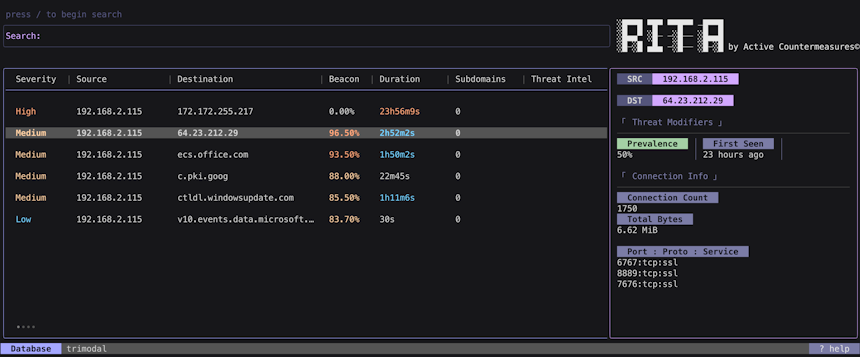
Image 2. RITA results for our connection in question.
Several characteristics of this connection are immediately suspicious:
- High Beacon Score: RITA flagged the connection with a beacon score of 96.50% across 1750 individual connections, indicating regular, automated communication.
- Significant Duration: The total connection duration is nearly 3 hours (2h52m2s), which is unusual when combined with such a high number of beaconing connections.
- Multiple Non-Standard Ports: What is most unusual is the use of three different non-standard ports 6767, 8889, and 7676, all for which RITA identifies as SSL/TLS traffic (tcp:ssl) to the same destination IP. Legitimate applications typically stick to a single port for a given service.
This combination of factors warrants a deeper investigation in AC-Hunter.
Network Traffic Analysis with AC-Hunter
Loading the data into AC-Hunter corroborates and expands upon our findings from RITA. The connection information panel confirms that communication to 64.23.212.29 occurred over the same three TCP ports – see Image 3 below.
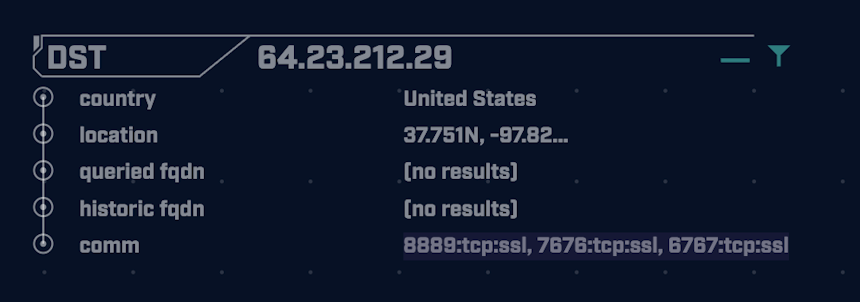
Image 3. AC-Hunter results for the connection in question.
The hourly connection graph provides a clear visual narrative of the three distinct phases of the attack – see Image 4 below.

Image 4. AC-Hunter’s hourly connection graph for the connection in question.
Typically, C2 beaconing produces a “flat top” on this graph, as the randomized sleep intervals average out over each hour. The hourly connection graph here reveals a pattern starkly different from this, with 3 clearly different phases.
For the first four hours, a very high number of connections occurred per hour, between 260 and 340, which points to a short beaconing delay. This was followed by a complete drop-off to zero new connections for approximately two hours, suggesting a single, persistent (long) connection was active during this period. For the remainder of the time, the activity settled into a very low and consistent number of connections per hour, between 10 and 14, indicating a switch to a beacon with a much longer sleep period.
This multi-modal behavior is also reflected in the interconnection period histogram, which shows two distinct clusters of beaconing activity and one long connection – see Image 5 below.
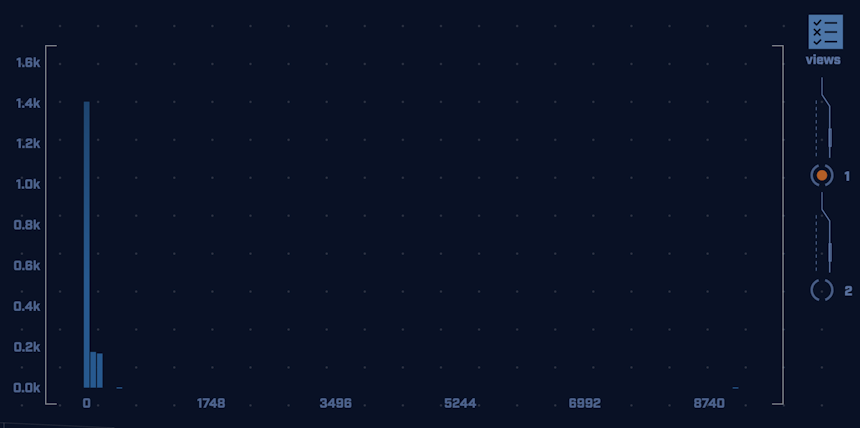
Image 5. AC-Hunter’s interconnection period histogram for the connection in question.
A large cluster of approximately 1400 connections had a very short delay, corresponding to the “fast” beaconing in Phase 1. A smaller cluster of about 340 connections had relatively longer delays, corresponding to the “low and slow” beaconing in Phase 3. Finally, a single connection is shown lasting 9108 seconds (over two and a half hours) which represents the persistent WebSocket connection from Phase 2.
Finally let’s turn our attention to the connection data histogram to see what insights it may provide – Image 6 below.
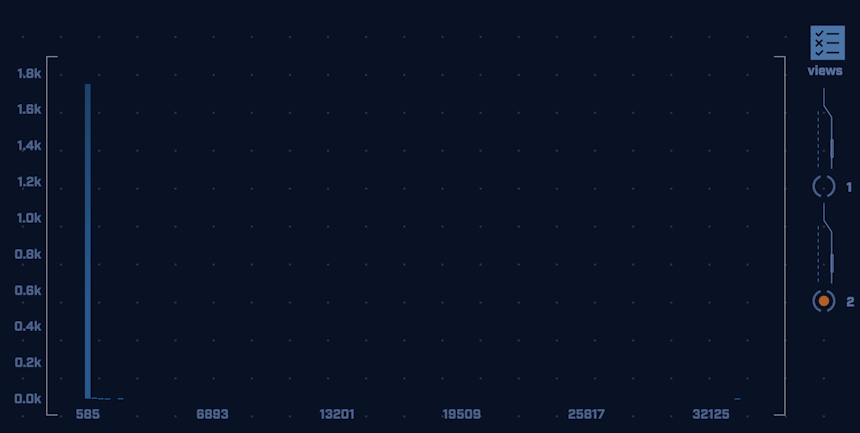
Image 6. AC-Hunter’s connection data histogram for the connection in question.
The vast majority of connections are small, 585-byte packets, representing the agent’s regular check-ins. A few outliers show larger data transfers, likely representing command output or file transfers. The largest of these, a transfer of over 33 KB, likely corresponds to file uploads that occurred during the persistent WebSocket session.
TLS Certificate Inspection
As we learned in our previous article, one good way to investigate possible C2 over HTTPS connection is by looking at the certificate details to see if perhaps we are dealing with a self-signed certificate, which is a major red flag.
There are a few ways in which we can inspect the certificate, one way is to look at the packets directly in Wireshark. After loading our trace file in Wireshark we can see the packets that correlate to the initial 3-way handshake, followed by the SSL Handshake that sets up the encrypted connection – see Image 7 below.
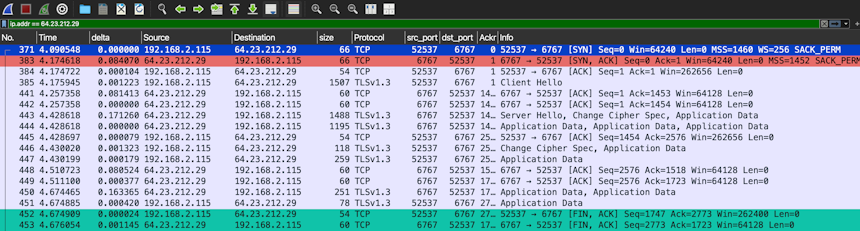
Image 7. The initial sequence of packets establishing the HTTPS connection as viewed in Wireshark.
Typically we can find the Certificate data right after the initial “Client Hello” and “Server Hello” messages. However, we can see here that this connection uses TLS 1.3. A key security improvement in TLS 1.3 is that all handshake messages after the initial “Server Hello” are encrypted, including the server’s certificate. In a passive network capture like this, the certificate itself is contained within the encrypted “Application Data” stream and cannot be inspected directly.
To decrypt this traffic, we would have needed to configure the client to log the session’s ephemeral TLS keys at the time the connection was made and then load that key log file into Wireshark. This is because TLS 1.3 uses a feature called Perfect Forward Secrecy (PFS). PFS uses the Diffie-Hellman key exchange algorithm to generate a unique, temporary session key for each connection. These keys are never transmitted over the network and are discarded after the session ends.
Since we did not log the session keys when the connection occurred, the certificate details are now cryptographically inaccessible to us from this PCAP alone.
This does not mean that using a self-signed certificate with TLS 1.3 is a perfect evasion technique. It simply shifts the point of detection from passive network sniffing to the endpoint itself or to an intercepting proxy, where the certificate can be validated before the encrypted session is established.
In an Alternate Universe…
Since the TLS 1.3 encryption prevents us from digging deeper into the traffic content, let’s imagine an alternate scenario where the attacker ran the same multi-modal C2 communication in the clear (over plain HTTP and unencrypted WebSockets). This will allow us to gain insight into the underlying mechanics of the C2 framework.
Network Traffic Analysis with AC-Hunter (Cleartext)
Analyzing the cleartext capture in AC-Hunter immediately reveals a key difference – see Image 8 below.
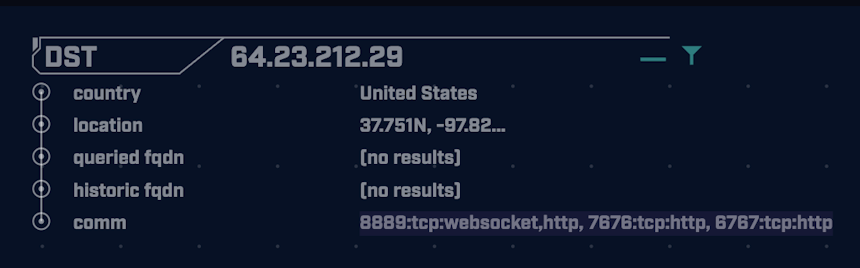
Image 8. AC-Hunter results for the cleartext connection.
The connection over port 8889 is now correctly identified as websocket, not just tcp:ssl as it was in Image 3.
This is because the WebSocket protocol begins with an HTTP/1.1 handshake. Once that’s been established, the client sends a HTTP request containing Connection: Upgrade and Upgrade: websocket headers. Essentially, these signify a proposal from the client to upgrade the connection from HTTP/1.1 to a WebSocket connection. If the server “agrees”, the connection will be upgraded.
Since the underlying HTTP/1.1 connection was encrypted in our initial trace file, the upgrade request itself was encrypted, making it invisible to passive analysis.
Payload Analysis with Go-Packet-Peeker
Using the Go-Packet-Peeker tool we developed for our previous investigation, we can extract and analyze the cleartext application-layer payloads from the trace file. Doing so reveals three distinct types of requests made by the C2 agent.
To understand these requests, we must first review the “heart” of HTTP-based C2 agent behavior. The first thing to know is that, because HTTP is a client-initiated protocol, the C2 agent must always initiate the conversation.
Typically, a C2 agent will “wake up” after its sleep interval (delay + jitter) and send a request to a predetermined endpoint on the server. This is the “check-in,” where the agent essentially asks, “Do you have a job for me?”. This is typically a GET request, as no data needs to be sent from the agent.
The server’s response will either contain a new task or indicate there is no work to be done. In case no job is issued, the agent will go back to sleep, whereafter it will repeat this same process.
Conversely, if a job was issued, the agent will execute the job on the endpoint, whereafter it will return some kind of result/confirmation to the server. Thus it sends another request in this case, and since some data (i.e. a payload) is involved, this is typically a POST request.
With this understanding, let’s analyze the 3 types of payloads we extracted from our trace file:
Payload 1: The WebSocket Upgrade (Image 9)
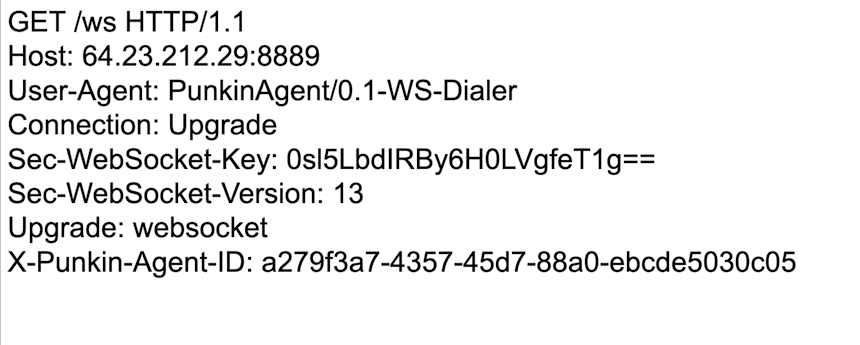
Image 9. A GET request to the /ws endpoint to upgrade the connection.
This GET request to the /ws endpoint is the invitation to upgrade the connection to WebSockets we discussed earlier. We can see the Upgrade: websocket header and a custom User-Agent of PunkinAgent/0.1-WS-Dialer.
We also see a custom header, X-Punkin-Agent-Id, which contains a UUID (Universally Unique Identifier). A UUID is a 128-bit number used to uniquely identify information. In this context, it is likely that each C2 agent is assigned a unique ID that it uses to authenticate and identify itself to the C2 server across different sessions and communication modes.
Payload 2: The Check-in (Image 10)
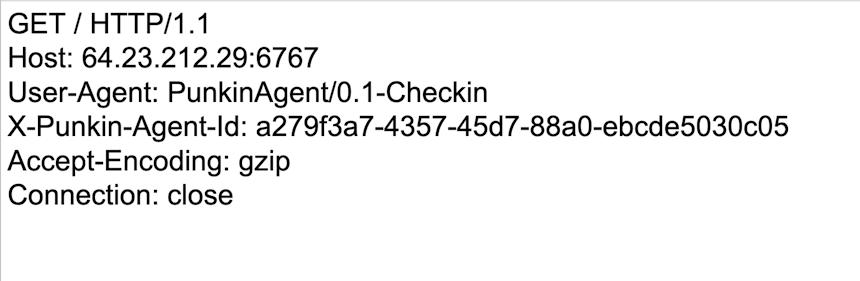
Image 10. A GET request to the / endpoint serves as the agent’s “check-in”.
This GET request to the server’s root directory (/) is the C2 agent’s heartbeat or check-in. The User-Agent, PunkinAgent/0.1-Checkin, explicitly states the request’s purpose: to ask the server for a new task.
Payload 3: The Result (Image 11)
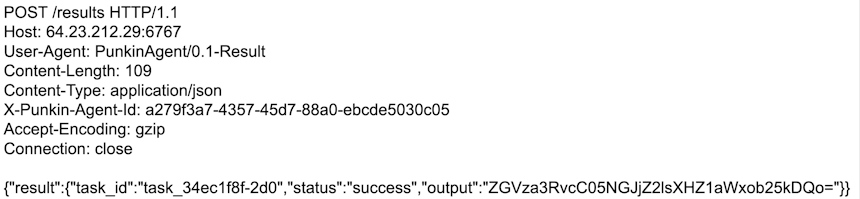
Image 11. A POST request to the /results endpoint returns results of a task.
This POST request to the /results endpoint is used to send the output of an executed command back to the C2 server. The body contains a JSON object with a task_id, a status of “success,” and an output field containing a Base64 encoded string.
Decoding this string (ZGVza3RvcC05NGJjZ2lsXHZ1aWxob25kDQo=) reveals the text: desktop-94bcgil\vuilhond, which is the typical output of the whoami command (host\username). This suggests that the C2 server tasked the agent to identify the current user, and the agent is now reporting the result.
Further Exploration
We have only scratched the surface of the cleartext data. We encourage you to use Go-Packet-Peeker on the provided trace files to extract all the payloads sent in both directions. By analyzing the sequence of check-ins and results, you can piece together the full narrative of the attacker’s actions during this compromise.
Using fragmented pieces of info to extrapolate and build a narrative regarding a compromise is a core threat hunter skill, so we encourage you to jump in and have fun!
Conclusion
This investigation into a multi-modal C2 framework highlights the increasing sophistication of modern adversaries. By dynamically altering their network communication profiles, attackers can balance the conflicting needs for operational efficiency and stealth, making detection more challenging for defenders.
This case study yields several key takeaways:
C2 Communication Profiles Are Not Monolithic
We cannot assume a C2 channel will maintain a single, static profile. The ability to switch from a fast beacon (for enumeration), to a persistent connection (for data transfer), and finally to a slow beacon (for hibernation) gives attackers tremendous flexibility and complicates detection.
Behavioral Analysis is Key
Even when traffic content is encrypted with advanced standards like TLS 1.3, the behavior of the communication leaves a trail. Tools like RITA and AC-Hunter excel at finding these behavioral anomalies. The combination of a high beacon score with a long duration, the use of multiple non-standard ports, and the distinct multi-phase pattern in the hourly connection graph were all critical clues that pointed to a single, evolving compromise.
Encryption Shifts the Battlefield
The adoption of TLS 1.3 makes passive network inspection more difficult but does not render it obsolete. It underscores the importance of a layered defense. While we couldn’t decrypt the certificate from the capture file, visibility at the endpoint or through a decrypting proxy would have still allowed for inspection. Threat hunting requires leveraging data from multiple vantage points.
Context is Critical
The analysis of the cleartext traffic reinforces a core principle: understanding the intent behind the communication is crucial. By recognizing the fundamental GET/POST cycle of HTTP-based C2, we could interpret the check-ins and results payloads to build a clear picture of the attacker’s actions. This not only has value for threat hunting, but perhaps even more so for remedial efforts.
Ultimately, this investigation serves as a reminder that as attackers evolve their techniques, our detection methodologies must also evolve. By focusing on behavioral patterns and combining the strengths of network and endpoint analysis, we can successfully unmask even the most sophisticated and adaptive threats.
Capture Files
PCAPs
Because… PCAPs, or it didn’t happen. 😊
The following PCAP files are packet captures taken from the same lab environment over a 24-hour time frame. The files were generated using Wireshark from the target host and include normal Windows OS traffic and normal network broadcast traffic. They have not been edited. The PCAPs are safe, standard PCAP files and do not include any actual malware.
Multi-Modal Numinon C2 24 Hour Capture
multimodal_numinon.pcapng
File Size: 229.6 MB
SHA-256 Hash: 209338FB258577AD56B2C71AFABFC6D079A30E0B1B100B324AD0EF216550524C
Zeek Logs
If you are an AC-Hunter or RITA user, we are providing the 24-hour Zeek logs for you to import directly into AC-Hunter or RITA. The following Zeek Logs have been taken from the same lab environment over a 24-hour time frame and include normal Windows OS traffic and normal network broadcast traffic. They have not been edited. The Zeek logs are safe, standard log files and do not include any actual malware.
Importing Zeek logs into AC-Hunter or RITA example:
ssh into your AC-Hunter or RITA server and upload all the Zeek logs contained in the zip file below (all files that have the ‘.log’ extension) into a temporary directory on the server. In this example, we are uploading the Zeek logs into /tmp/multimodal_numinon_zeek/
Then run the following command:
For AC-Hunter v6.x and RITA v4.x and earlier:
rita import /tmp/multimodal_numinon_zeek/*.log multimodal-numinon
For RITA v5.x+:
rita import --logs=/tmp/multimodal_numinon_zeek/*.log --database=multimodal-numinon
You will now have a new database in the AC-Hunter UI/web interface or RITA CLI titled “multimodal-numinon” you can select and view.
Multi-Modal Numinon C2 Zeek Logs
multimodal_numinon_zeek.zip
Size: 770.5 KB
SHA256 Checksum: A4C0A850FE88FE129E88C73C1F69874B26FF807D4FF2AB0218EBA4089A6E607B
Discussion
Want to talk about this or anything else concerning threat hunting? Want to share how good (or not so good) other detection tools were able to detect this sample?
You are welcome to join our Discord server titled “Threat Hunter Community” to discuss topics surrounding threat hunting. We invite you to join our server here.
A huge thanks to Bill Stearns, Keith Chew and Chris Brenton for allowing me the opportunity to contribute to this awesome initiative, as well as their guidance, helpful feedback, and for being a couple of stand-up gents.
Live long and prosper!

Faan is a security researcher specializing in detecting post-exploitation malware, with a focus on network communication. He likes exploring threat hunting via a purple team approach by simulating adversarial activity to develop novel threat hunting detections. He also loves building covert channels and unusual malware communication methods, creating threat emulation tools that inform new detection vectors.