Safe vs Malicious: DNS Edition
by Hermon Kidane & Ashley Apgood
Case: Connection pair to a public DNS resolver that doesn’t represent DNS traffic.
Introduction
Threat hunting is an integral part of ensuring you have a secured network. A key component in threat hunting is determining whether the connection pair you are looking at is safe or malicious. This can be tricky for various reasons, including but not limited to working with a misconfigured system, dealing with a smart attacker, or simply observing odd network traffic. Below we will look at the connection pair 192.168.0.1 to 4.2.2.2 and conclude, based on our observations, whether it is safe or malicious.
Initial Findings
With this particular case we’re looking at a connection pair that is going out to a public DNS resolver (4.2.2.2).
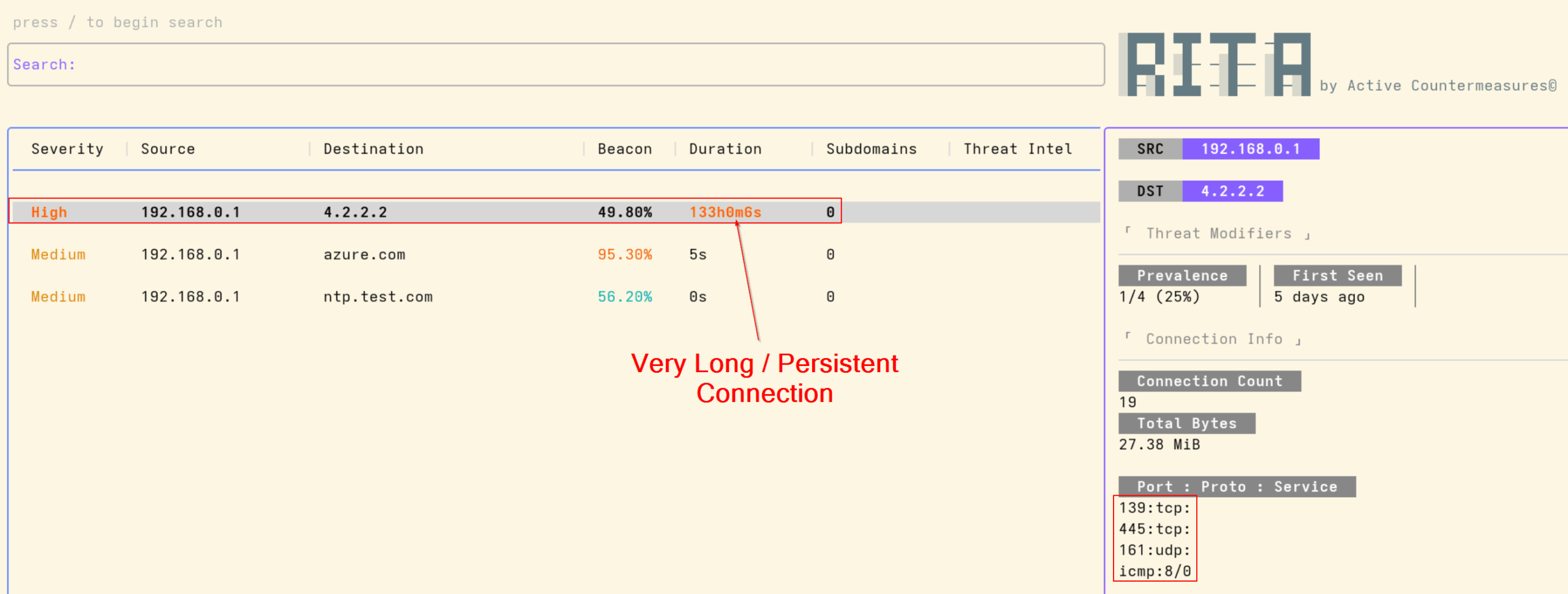
Fig. 1: Rita v5 Connection View
Looking at the initial data above in RITA, we can see a few oddities right away. The first oddity being the port numbers and protocols used. Typically DNS traffic uses UDP port 53 for the vast majority of queries along with TCP port 53 for larger responses like Zone Transfers. TCP port 53 is also used where reliability is critical.
The data being shown indicates that the port numbers and protocols used are UDP port 161, TCP port 139 and port 445, and ICMP type 8/0. The ports and protocols being used do not correspond to normal DNS traffic.
We know that this is indeed a public DNS resolver from our online research, from various resources listed here below:
- https://ipinfo.io/4.2.2.2#:~:text=4.2.%202.2%20*%20Summary.%20*%20Hosted%20domains
- https://www.shodan.io/host/4.2.2.2
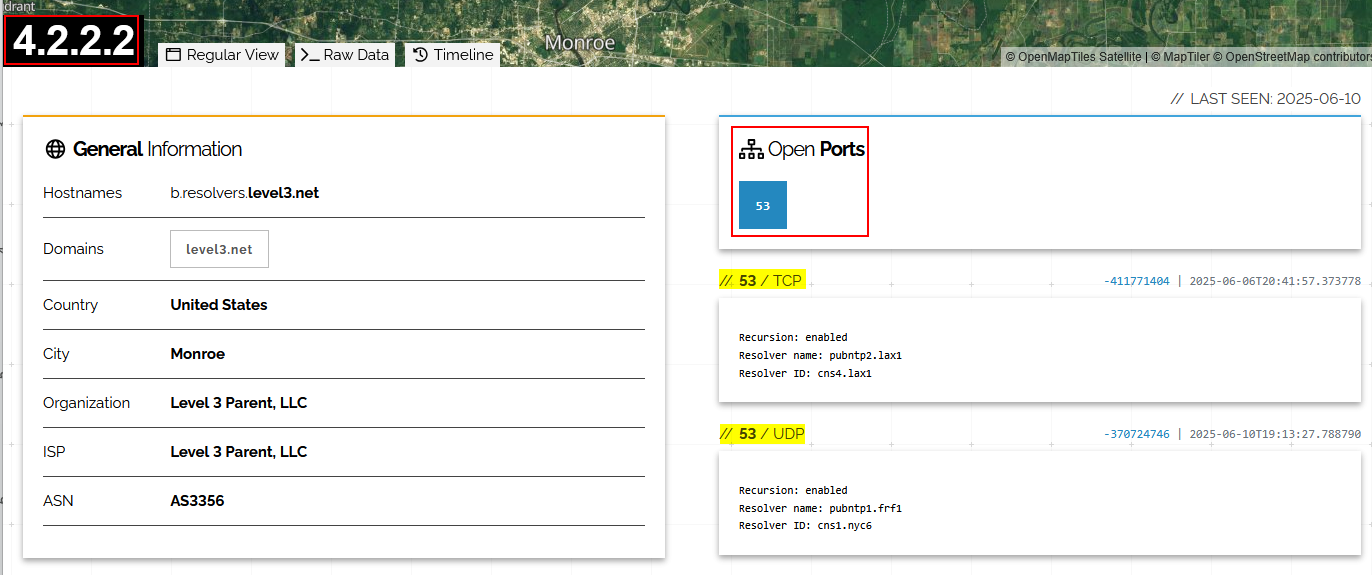
Fig. 2: Shodan details for 4.2.2.2
The second oddity we noticed was the long connection of 133 hours. As an analyst this should raise some red flags and be noted as suspicious due to the network traffic having a long connection along with protocols that do not exhibit a normal traffic pattern.
Deeper Investigation
Total Data Sent
Normally such attacks over C2 aim to maintain persistence, and a long connection typically is used for persistence or data exfiltration. A good indicator of data exfiltration is the amount of data being sent across to the destination.
In this particular case, the data sent in total is less than 2 Kilobytes, which in the modern day of computers is very little. If there was a data exfiltration we would see a decent amount of data being siphoned off to the destination.
This doesn’t necessarily mean this traffic is safe, but it supports our overall analysis as part of our reasoning for identifying the maliciousness or non-maliciousness of the connection pair.
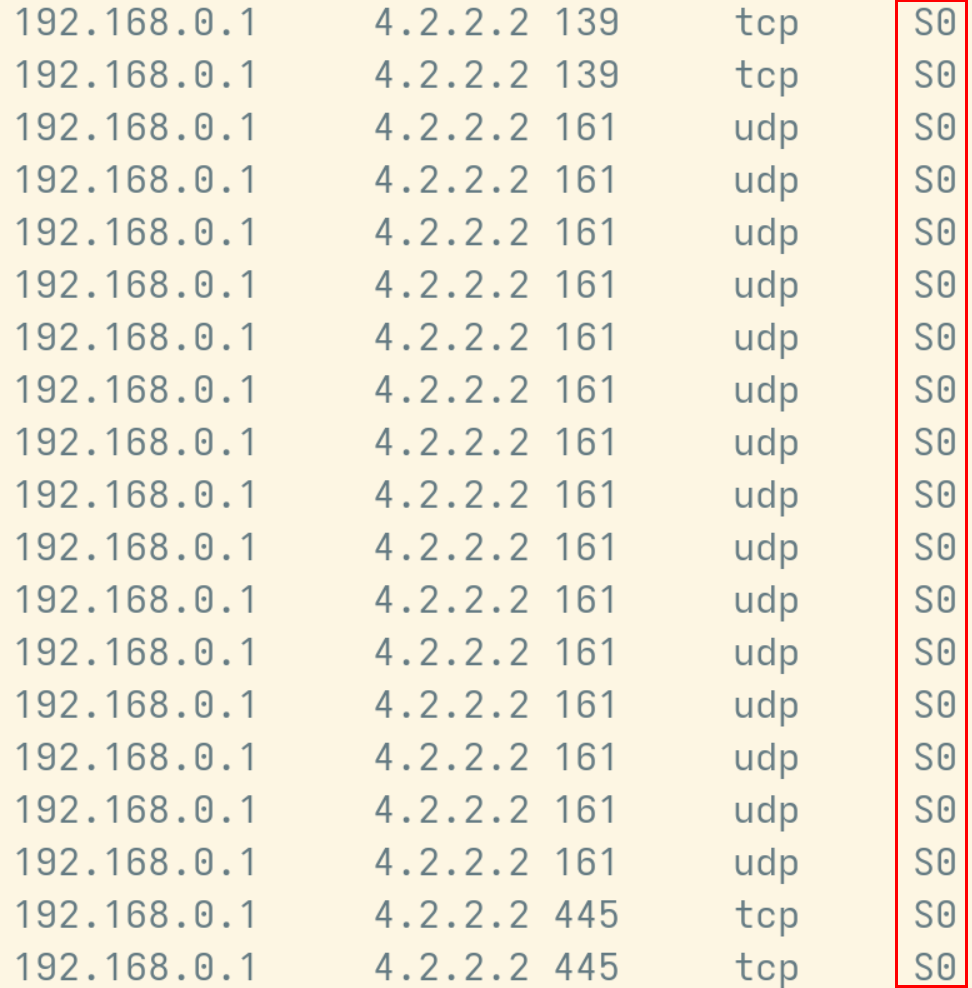
Fig. 3: Zeek logs filtered for src ip, 192.168.0.1 and dst ip, 4.2.2.2 with protocol and conn_state
Zeek Connection Values
One item highlighted in Fig. 3 is Zeek’s connection state value. This value is determined based on the behavior of the client or server. This does indeed tell a story.
In our case, the value assigned here is S0 – and this means that a connection attempt is seen, but there was no reply.
If you are interested in learning more about Zeek and the various connection values the documentation can be found here:
We can understand from this that our internal host reached out to the destination host, but the destination host never responded. This is an expected behaviour from the DNS server.
In general, servers respond using only the ports that are open or that they are listening on, which helps secure our servers as well. So if we have a DNS server, assuming we are not running any other applications, then it would listen on TCP/53 and UDP/53, any other connection attempt should be dropped by the server.
We can also verify this by pivoting to the Zeek data and analyzing the captured traffic. When trying to dive deep and analyze the Zeek logs, one of the challenges is filtering the log entries that we want to see from the rest. The best approach for this is extracting the log entries related to the addresses or fully qualified domain names from the collective log. This can be done by using the scripts provided by Active Countermeasures using the link below:
cat conn*.log | zcutter ts id.orig_h id.resp_h id.resp_p proto conn_state | grep -Fw 4.2.2.2 | grep -E '(:|[^0-9])161([^0-9]|$)|(:|[^0-9])139([^0-9]|$)|(:|[^0-9])445([^0-9]|$)'| sort -k4,4
Breakdown:
- cat conn*.log: Reads and outputs the contents of all connection logs in the current directory that match the pattern conn*, thanks to the wildcard *.
- | zcutter ts id.orig_h id.resp_h id.resp_p proto conn_state: Pipes the output into zcutter to extract only the relevant fields:
ts: Timestamp of the connection
id.orig_h: Originating host IP address
id.resp_h: Responder’s IP address
id.resp_p: Responder’s port
proto: Protocol used (e.g., TCP, UDP)
conn_state: Zeek’s connection state code - | grep -Fw 4.2.2.2: Filters the output to show only lines that contain the IP address 4.2.2.2.
-F: Treats the search pattern as a fixed string (not a regex)
-w: Matches only whole words, ensuring partial matches (e.g., 104.2.2.2) are excluded - | grep -E ‘(:|[^0-9])161([^0-9]|$)|(:|[^0-9])139([^0-9]|$)|(:|[^0-9])445([^0-9]|$)’: Further filters the results to only include connections involving SNMP (161), NetBIOS (139), or SMB (445) ports using extended regular expressions.
- | sort -k4,4: Sorts the results based on the 4th column, which is id.resp_p (responder port), grouping similar services together for easier review.
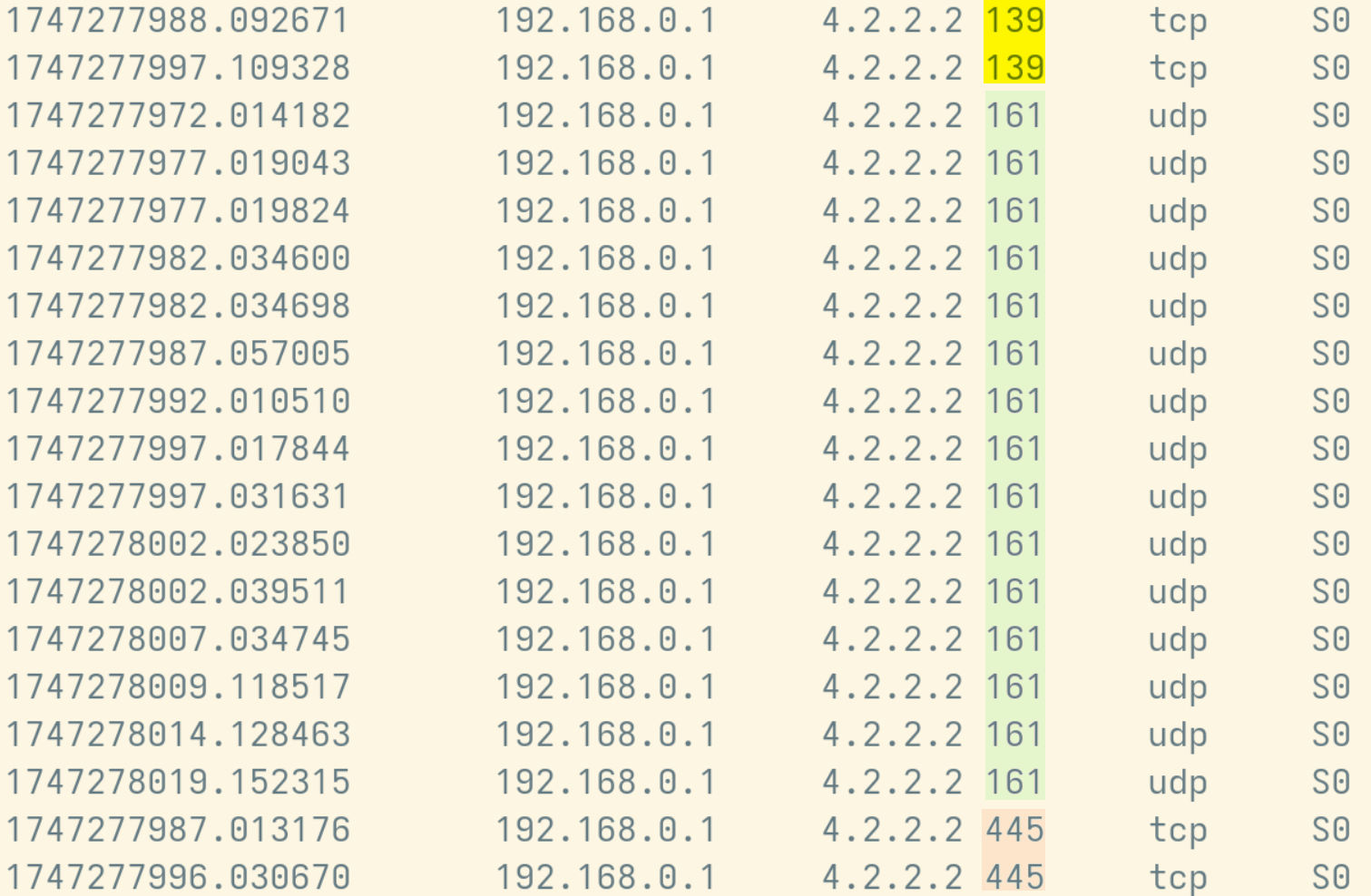
Fig. 4: Zeek logs filtered for src ip, 192.168.0.1 and dst ip, 4.2.2.2 with dst ports 139, 161, 445 from conn.log
These are packets filtered from Zeek logs, specifically from the conn.log. As we can see, they are not using the standard port used for DNS. We can also see from the conn_state (Zeek Connection State) that the destination has not responded to the source IP. This is indicated by the ‘S0’ in the screenshot above.
The ICMP Traffic
Another thing we notice with this particular connection pair is that there’s ICMP traffic associated with it, as we can see from the RITA dashboard:
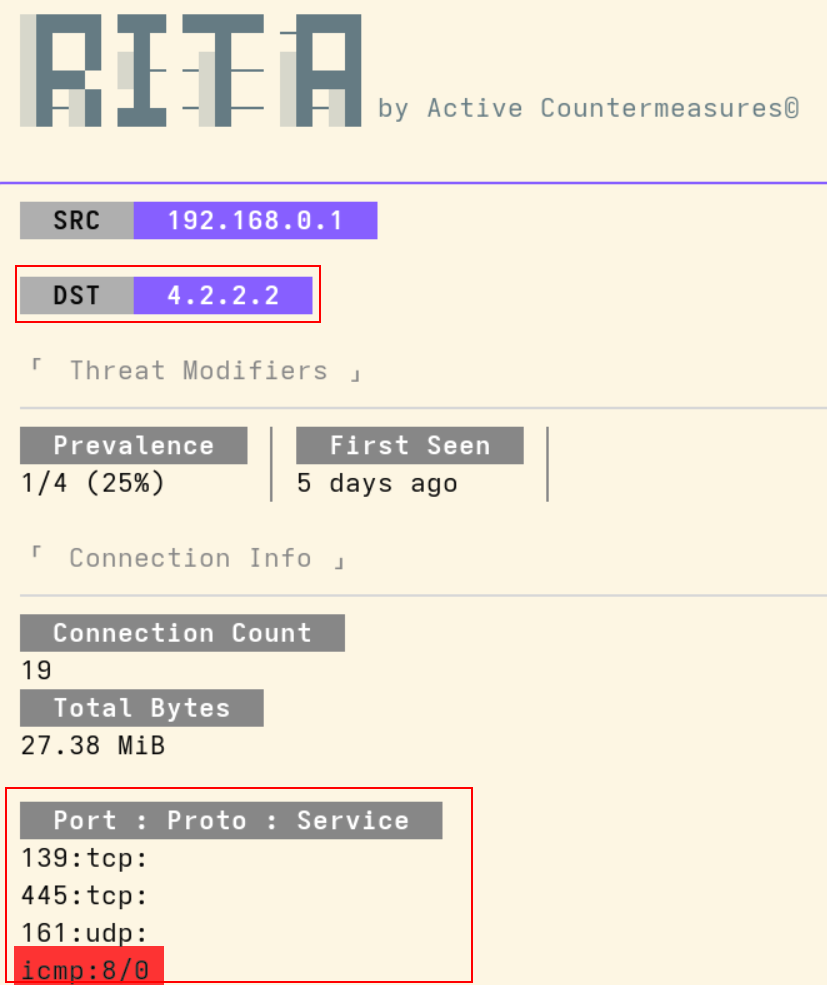
Fig. 5: RITA v5 Connection View which shows the protocols associated with the connection
So going back to the Zeek logs, we can filter the ICMP traffic associated with this particular connection pair:
cat *.log | zcutter ts id.orig_h id.orig_p id.resp_h id.resp_p proto orig_bytes resp_bytes conn_state | grep -Fw '4.2.2.2' | grep -w '192.168.0.1' | grep icmp
Breakdown:
- cat *.log: Reads and outputs the contents of all log files in the current directory that match the pattern *.log, thanks to the wildcard *. This includes logs like conn.log, dns.log, snmp.log, etc
- | zcutter ts id.orig_h id.orig_p id.resp_h id.resp_p proto orig_bytes resp_bytes conn_state: Pipes the output into zcutter to extract only the relevant fields:
ts: Timestamp of the connection
id.orig_h: Originating host IP address
id.orig_p: Originating host port
id.resp_h: Responder’s IP address
id.resp_p: Responder’s port
proto: Protocol used (e.g., TCP, UDP, ICMP)
orig_bytes: Number of bytes sent by the originator
resp_bytes: Number of bytes sent by the responder
conn_state: Zeek’s connection state code - | grep -Fw ‘4.2.2.2’: Filters the output to show only lines that contain the IP address 4.2.2.2
-F: Treats the search pattern as a fixed string (not a regex)
-w: Matches only whole words, ensuring partial matches (e.g., 104.2.2.2) are excluded - | grep -w ‘192.168.0.1’: Narrows the results down to lines that include the string icmp, indicating that the protocol in use is ICMP (used for diagnostic tools like ping and traceroute).
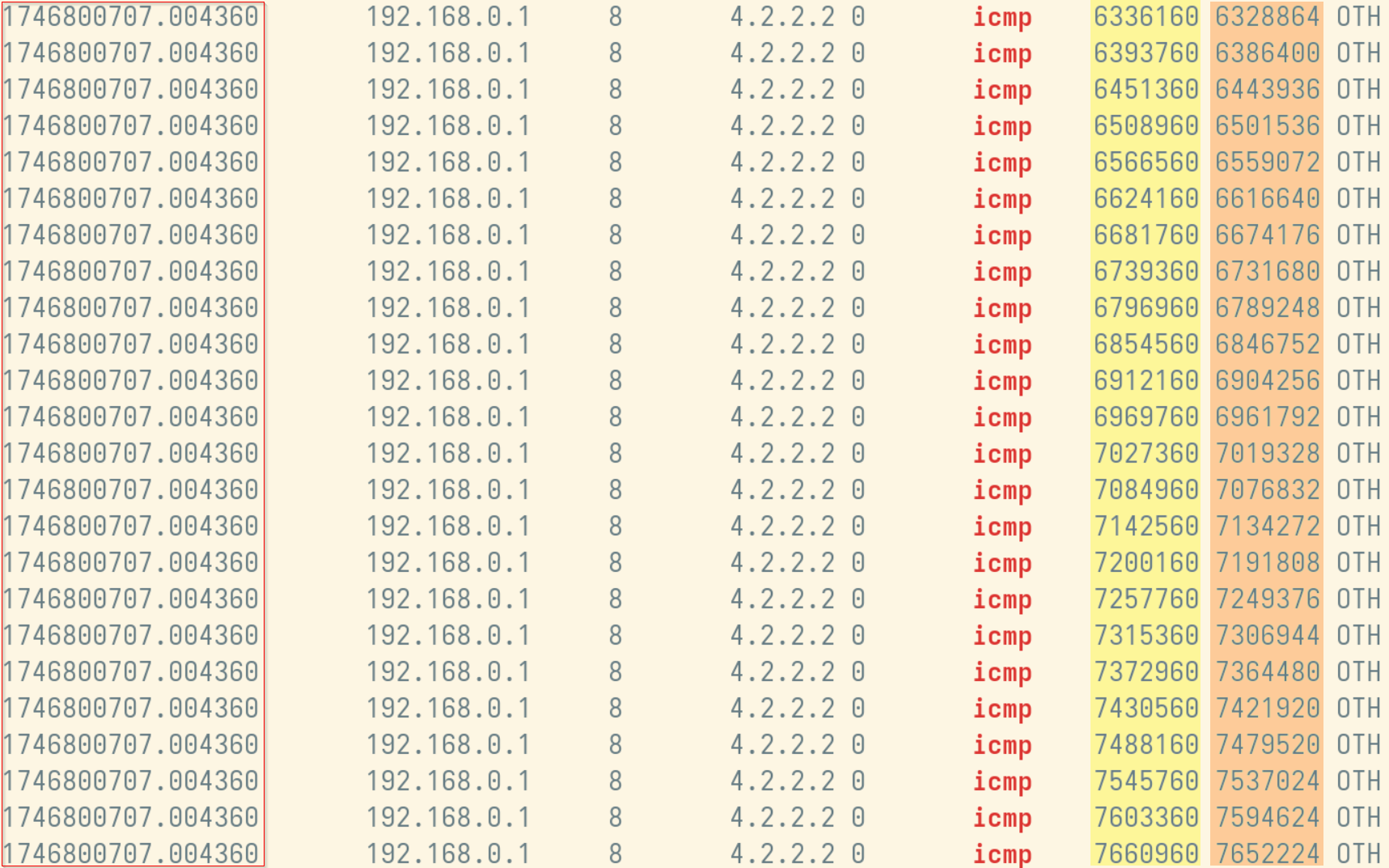
Fig. 6: Zeek logs filtered for src ip, 192.168.0.1 and dst ip, 4.2.2.2 ICMP traffic only
There are a couple of interesting things here:
Like the above traffic we analyzed, this is ICMP traffic directed towards a public DNS server.
The second thing here is that when we look at the orig_bytes and resp_bytes in a single session, there’s a difference. This is showing us there’s a size difference between the echo request and reply, which normally should be the same. Here’s a good example on how it should look like:
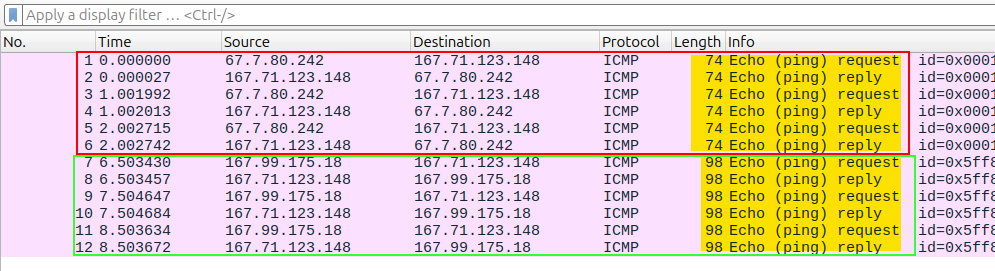
Fig. 7: Wireshark example on how typical ICMP traffic looks like
We can see that the echo request and reply packets have the same size when it comes to that specific ping session. (Note: in Wireshark, the size of the packet is listed as Length)
The other interesting finding is the timestamp, which is identical for every ICMP echo request, which is not a normal behavior. The default interval for most operating systems is 1 second, however there is an option to tweak the delay between echo requests, but having the same timestamp for 24 packets is very unusual behaviour. This is worrying because it could be a sign that there was/is a Ping Flood Attack.
Going back to the previous example (Fig. 7) we can see that there’s about a 1 second delay between each echo request.
One key piece of information from Zeek’s weird log is that the internal address seems to be a Tunnel. Let’s filter and analyze Zeek’s weird log and what leads us to believe the source address is possibly a tunnel:
cat weird.* | zcutter id.orig_h name | head
Breakdown:
- cat weird.*: Concatenates and outputs the content of all files that start with weird. (e.g., weird.log, weird_2025_1_22.log1, etc.). The wildcard * ensures all matching files are included.
- | zcutter id.orig_h name: Pipes the output into zcutter, and displays only the selected fields:
id.orig_h: IP address of the originating host
name: Type of unusual or unexpected event detected by Zeek - | head: Limits the output to the first 10 lines for a quick preview.
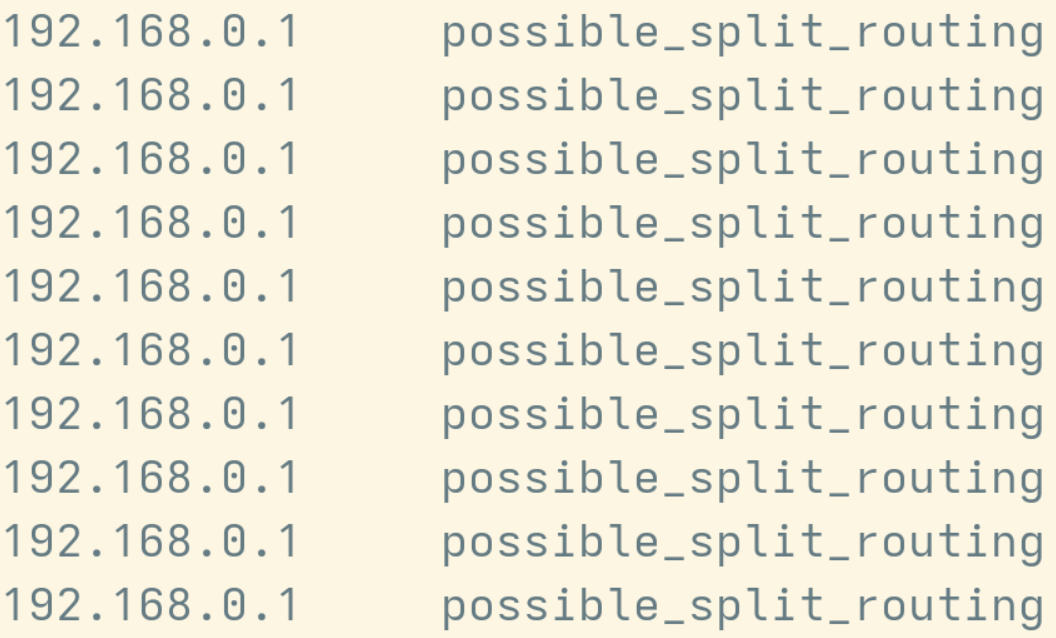
Fig. 8: Zeek Weird logs filtered for src ip and name
We can observe multiple unexpected events associated with the internal IP address we’re currently investigating. One notable event is “Possible Split Routing”, which provides a valuable clue. Split routing typically refers to scenarios involving VPN tunnels, where only specific networks or IP addresses are routed through the tunnel, while the rest of the traffic is sent directly over the internet.
And this could explain the suspicious timing data we’re seeing – which is when using a tunnel it is possible that there’s buffering, or a temporary storage of packets before routing them to the destination.
This could make it seem like the ICMP traffic is being sent out at the same exact time.
The SNMP Traffic
SNMP traffic to a public DNS server is very odd at first glance. SNMP is normally used to communicate/send internal network related data. Usually this is used for monitoring and troubleshooting network devices. Sending SNMP traffic or data to a public DNS server or any destination out to the internet could be extremely risky. SNMP version 1 and version 2 sends user passwords over cleartext, only SNMP version 3 uses hash based authentication and encryption.
Let’s check out the SNMP version being utilized and analyze the Zeek logs:
cat snmp.* | zcutter ts id.orig_h id.resp_h id.resp_p version community | grep -Fw 4.2.2.2
Breakdown:
- cat snmp.*: Reads and outputs the contents of all SNMP-related log files in the current directory that match the pattern snmp.*, thanks to the wildcard *. This typically includes files like snmp.log, snmp_sensor_01_2025_01_19.log, snmp.2025-07-27.log, etc.
- | zcutter ts id.orig_h id.resp_h id.resp_p version community: Pipes the output into zcutter to extract only the relevant fields:
ts: Timestamp of the SNMP transaction
id.orig_h: Originating host IP address
id.resp_h: Responder’s IP address
id.resp_p: Responder’s port (usually 161 for SNMP)
version: SNMP protocol version used (e.g., v1, v2c, v3)
community: Community string used in the SNMP request (like a password or identifier) - | grep -Fw 4.2.2.2:Filters the output to show only lines that contain the IP address 4.2.2.2.
-F: Treats the search pattern as a fixed string (not a regex)
-w: Matches only whole words, ensuring partial matches (e.g., 104.2.2.2) are excluded
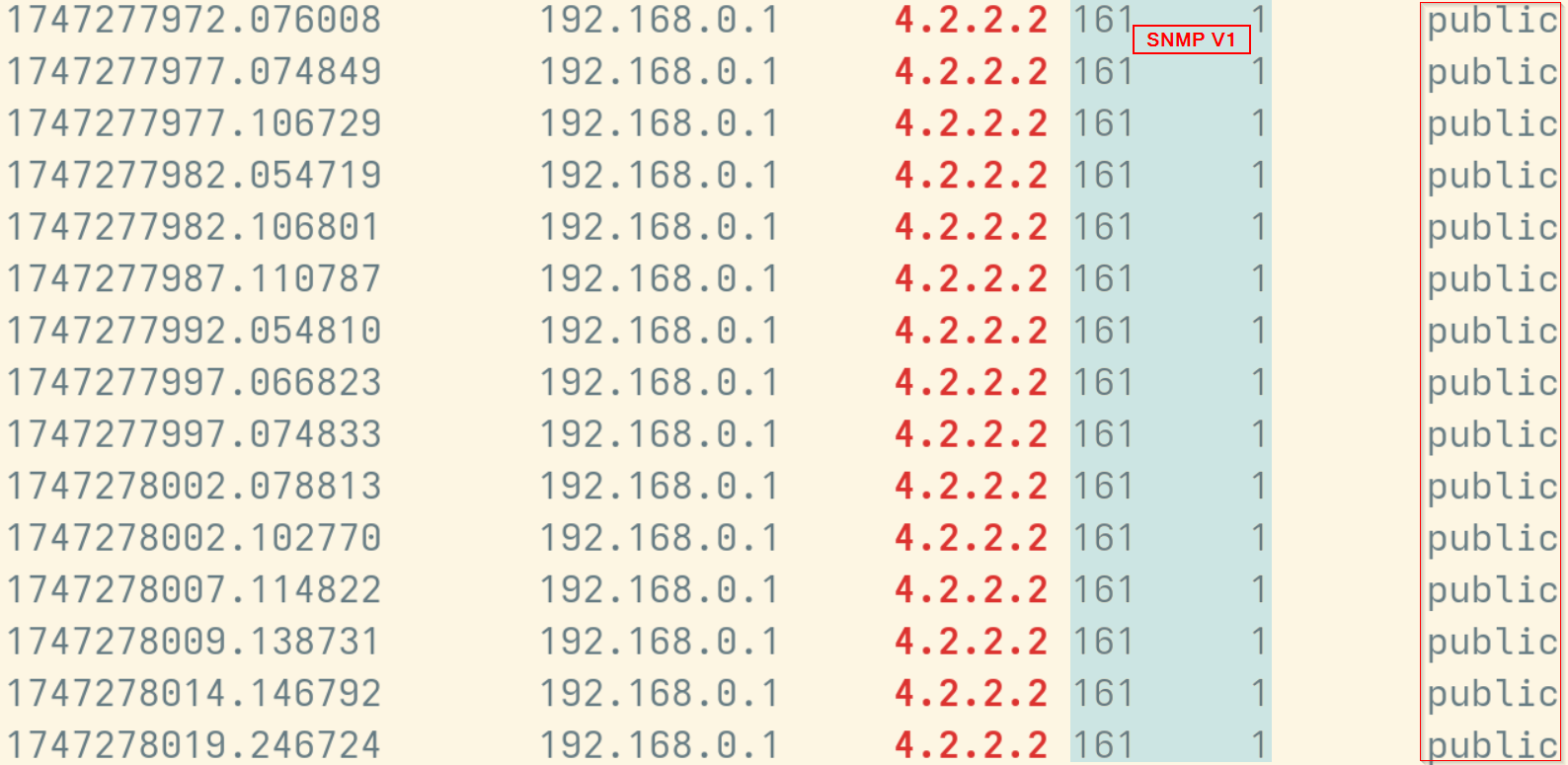
Fig. 9: Zeek SNMP logs filtered for src ip, 192.168.0.1 and dst ip, 4.2.2.2
From the image above we can see that this is SNMP traffic, version 1 and the community string is “public”. Although sending out SNMP traffic to the internet, especially unencrypted, is not ideal. The logs above show that there was an SNMP traffic request with the community string “public” and the destination had the SNMP service running, and “public” was its community string (Which is the default read-only password that ships with SNMP v1 and v2c devices).
This means that the SNMP traffic being sent to the outside is not carrying any data, rather it’s sending a request to the remote address over the internet using a read only community string in order to get SNMP data.
The SMB Traffic
The SMB (Server Message Block) protocol, which uses ports 139 and 445, is used primarily for file and printer sharing over multiple computers. In our particular case, much like the SNMP traffic above, there’s no successful connection to the remote address. Instead we again see that there was a connection attempt but no reply from 4.2.2.2, as seen in Figure 4.
While sending SMB traffic over the internet is not a good security practice, we can deduce that there was no successful C2 communication out to the remote host.
Conclusion
Using the data we have collected above, we can generate a few different theories as to why this traffic is occurring. Typically, when determining whether network traffic is acting as a Command and Control channel, an analyst would be concerned about two main objectives: Persistence and Data Exfiltration.
- Persistence: the fact that the Zeek conn_state’s(S0) showed that there was a connection attempt but no response from the traffic, indicates that there was no successful C2 communication.
- Data Exfiltration: going back to the transferred bytes it doesn’t indicate any sort of data exfiltration due the lack of significant data transfer.
Initially, the data collected above led us to believe that something malicious was potentially occurring such as an ICMP flood attack or issues stemming from a misconfigured system. This was due to the high number of ICMP traffic occurring all at the same time along with the high amount of original and response bytes associated with the traffic. However, upon further review of the ICMP traffic we determined that the IP address 192.168.0.1 was being used as a legitimate tunnel to access various other IP addresses. This would account for the odd timing of the ICMP traffic due to possible buffering or temporary storage of packets before routing them to their destination.
Using this information and all of the data above, we are of the opinion that this data connection pair represents a VPN connection to the internet. While we can not say without a shadow of a doubt without going beyond the raw network traffic and checking the system of interest’s hosts, endpoints, and firewalls – the data we do have suggests that this traffic is safe and is being used as a VPN. When reviewing the SNMP traffic, we observed a connection attempt but there was a lack of response, S0, from 4.2.2.2. This indicates that it was not a successful connection and there was no response returned from the destination of 4.2.2.2.
That being said, this investigation did shed light on a few security flaws we believe this network possesses. This is supported further by current SNMP traffic to remote addresses, which is risky in and of itself. Along with the SMB traffic being sent out to a remote public system over the internet. This suggests a potential security gap in this internal network infrastructure. These vulnerabilities should be addressed and used to further improve security practices.
Resources
If you wish to learn more about the topics discussed above please see the resources below:
The Beginner’s Guide to Command and Control Part 1 – How C2 Frameworks Operate
The Beginner’s Guide to Command and Control Part 2 – The Role of C2 in Modern Threat Campaigns
Hermon Kidane & Ashley Apgood